

In this article, you will learn about database proxies and how to connect a Java web service, implemented with Spring Boot and JPA, to a MaxScale instance (an intelligent database proxy) configured as a read-write splitter. A read-write splitter automatically forwards writes to primary nodes and reads to replicas. You can run the example by following the instructions in this GitHub repository.
What is a database proxy?
In computing, a proxy is a server application that forwards requests to other servers and returns their responses back to the client. A database proxy forwards SQL statements to database servers and returns the results back to the client. Besides merely acting as a relay between clients and servers, proxies abstract away underlying architectures and provide added functionality in the middle without affecting the applications or the databases. A database proxy, for example, can completely hide the details of a complex and dynamically-changing database topology and potential server failures from application developers. An application connects to a database proxy as if it was a single database.JDBC replication mode
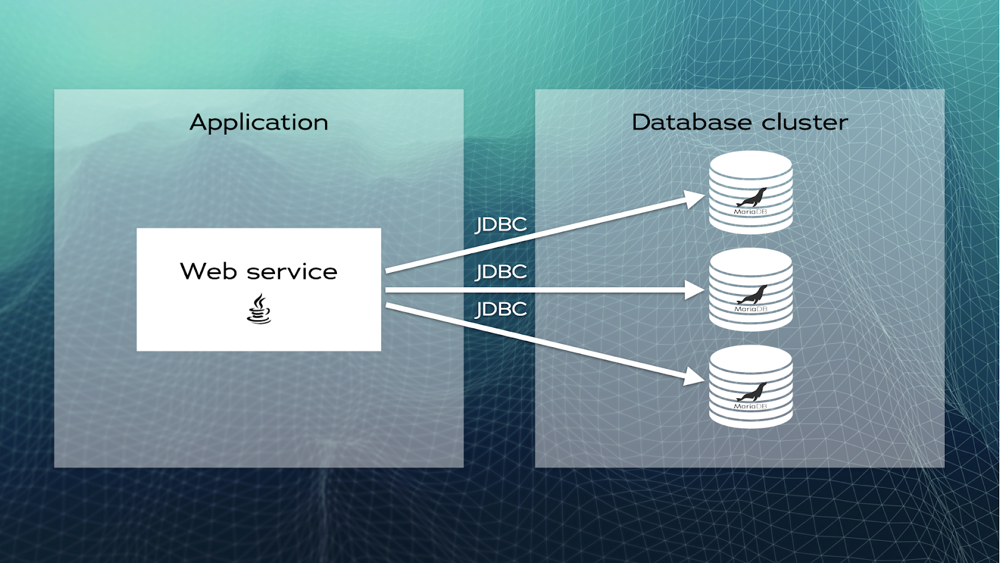
Imagine you have a Java web service that connects to a MariaDB database. You decide to scale the database by adding two MariaDB replica nodes to your backend and enabling replication. Since the MariaDB JDBC driver has a High Availability (HA) replication mode, you add the IP addresses of the added nodes to the JDBC connection string and let the driver do the load-balancing for you:jdbc:mariadb:replication://192.0.0.10,192.0.0.11,192.0.0.12/demoThrough the JDBC driver, the application sends write statements to the primary node (192.0.0.10) and read statements to the replicas (192.0.0.11 and 192.0.0.12). When more replicas are needed, they can be added to the JDBC connection string. However, this effectively requires a change in the application configuration. The same happens if replicas are removed from the cluster.
A web service using the MariaDB Connector/J replication mode
Decoupling database topology details from applications
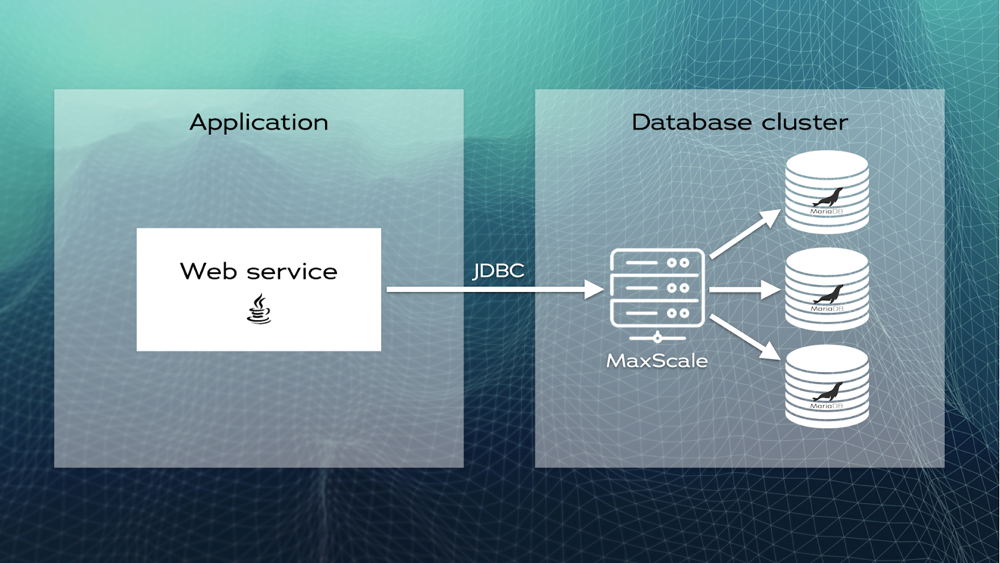
To isolate the application from the underlying database topology, you decide to introduce a database proxy. This proxy can be configured to do the read-write splitting job. Instead of connecting the application directly to the database servers, you connect it to the database proxy instance (for example, MaxScale or ProxySQL):jdbc:mariadb://192.0.0.200/demoTo the application, the database looks like a single endpoint even though it has three nodes in the example. The database topology can now change transparently without affecting the application configuration. For example, a DevOps engineer or a DBA is able to add or remove nodes without affecting uptime.
A web service decoupled from the database cluster topology
A practical example using MaxScale and Spring Boot
Let’s study a practical example implemented with Java, Spring Boot, and JPA with MaxScale as a read-write load balancer.What is MaxScale?
MariaDB MaxScale is a database proxy that routes requests using configuration settings. It understands whether a SQL statement is a read or a write before routing it to primary or replica nodes. MaxScale also includes features such as dynamic data masking, query throttling, query rewriting, data import and export from and to Kafka, Mongo protocol conversion, and more.Setting up the database cluster
You need a database cluster with a primary/replica topology. Follow the tutorials on how to configure at least one primary server and one replica server using either MariaDB Enterprise Server or MariaDB Community Server. Alternatively, and only recommended in development or CI environments, you can set up replication using Docker containers. After setting up replication, you should have two instances of MariaDB databases running on physical computers, virtual machines, or containers. You’ll need their IP addresses or fully qualified domain names (FQDN). Create a new database user that the database proxy (maxscale) will use to connect to the MariaDB databases. Run the following on the primary node:
CREATE USER maxscale@'%' IDENTIFIED BY 'password';
GRANT SELECT ON mysql.* TO maxscale@'%';
GRANT SHOW DATABASES, SLAVE MONITOR ON *.* TO maxscale@'%';
Finally, you need the database proxy itself. MaxScale requires Linux (it makes extensive use of the asynchronous I/O capabilities of Linux). You can download and install it on a physical machine, virtual machine, or Docker container. You can also use your favorite Linux package manager to install MaxScale (for example
apt install maxscale on Ubuntu or yum install maxscale on RedHat distributions). After installation, enable the MaxScale GUI by replacing the contents of the /etc/maxscale.cnf file with the following:
[maxscale]
threads=auto
admin_host=0.0.0.0
admin_secure_gui=false
Once configured, you can start MaxScale. On systems that use systemd, run the following:
sudo systemctl start maxscaleOn other systems run:
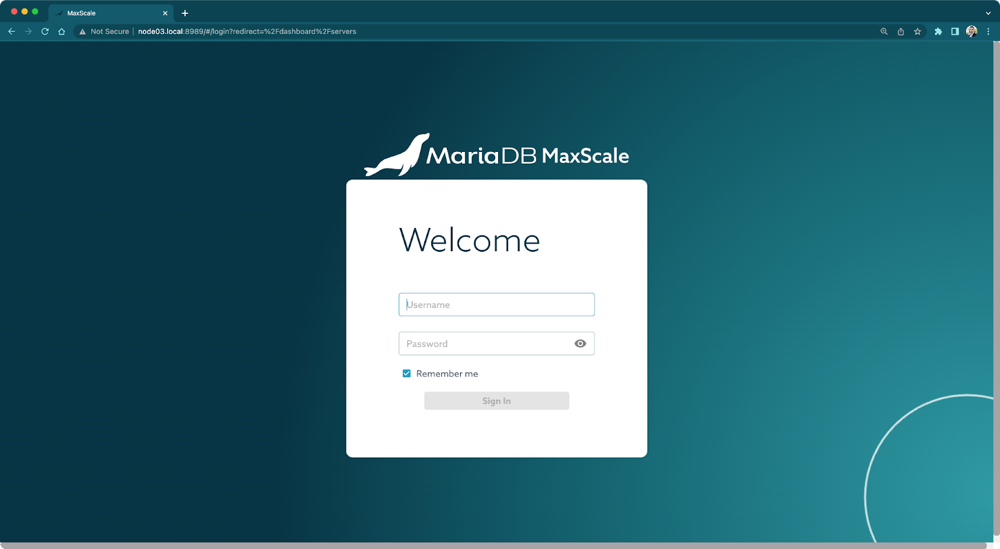
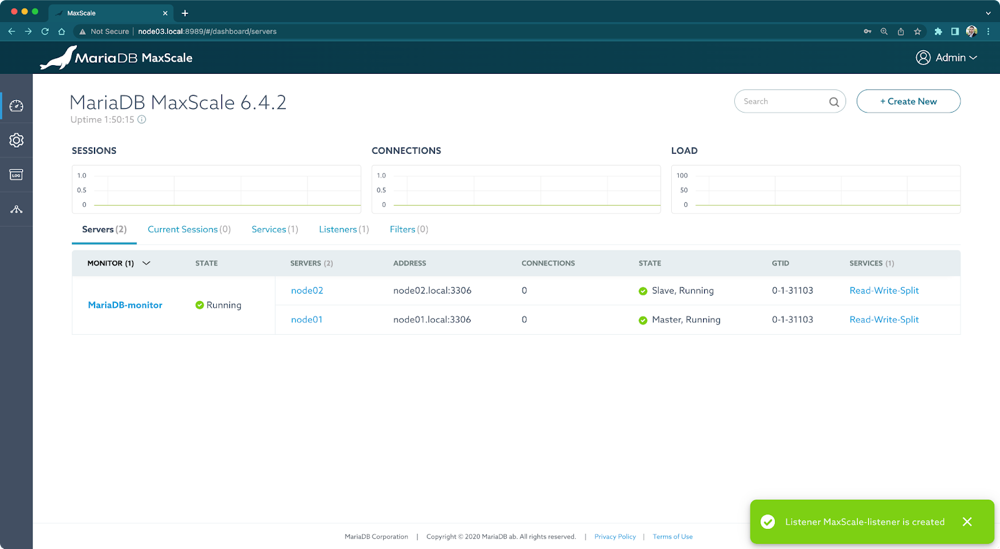
sudo service maxscale startUse a web browser to access the MaxScale GUI. You need the IP address or FQDN of the machine on which MaxScale is running. In the previous example, the IP was 192.0.0.200. However, it’s very likely that you have to use a different IP address (in my case, I configured the FQDN node03.local in a Raspberry Pi connected to my local network). The default port is 8989. You should see the welcome screen.
MaxScale GUI welcome page
The default credentials are:- Username: admin
- Password: mariadb
Creating MaxScale objects
There are four types of MaxScale objects that we need to create using the MaxScale GUI:- Servers: The MariaDB database servers, both, primary and replicas.
- Monitors: Check the status of database servers. Things such as whether a server is up or down, or whether it is a primary or a replica. Monitors also perform automatic failover when a primary server goes down.
- Services: Make a set of servers appear as if they were a single one to applications. Services use a router to decide which server should execute a query.
- Listeners: Defines a port on which MaxScale listens. Applications connect to MaxScale using this port.
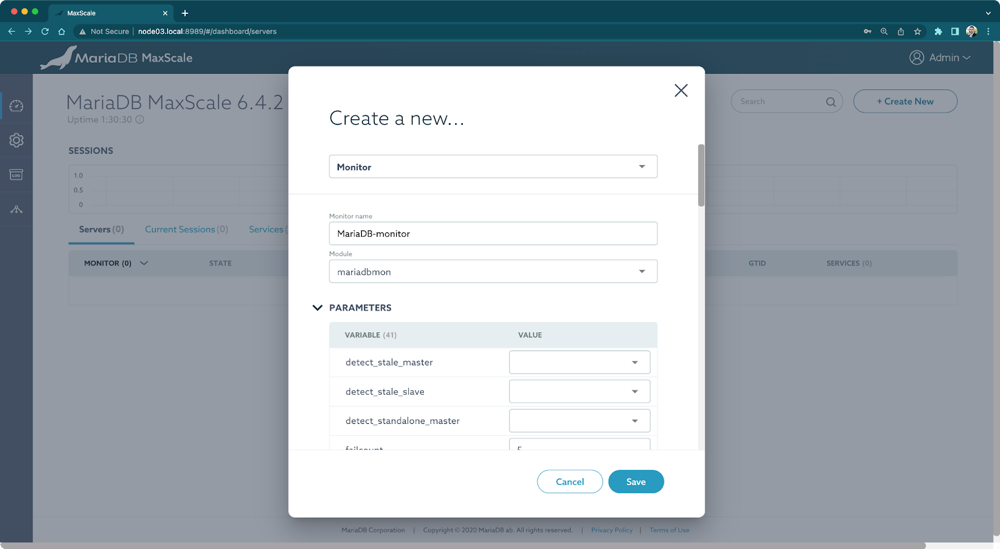
- Monitor name: MariaDB-Monitor
- Module: mariadbmon
- user: maxscale
- password: password
Creating a new configuration object using the MaxScale GUI
Create the servers. Click on +Create New. Select Server and fill in the details for the primary server:- Server name: node01
- address: <the IP address or FQDN of the primary server>
- MONITOR: MariaDB-Monitor
- Service name: Read-Write-Split
- Router: readwritesplit
- user: maxscale
- password: password
- SERVERS: node01, node02
- Listener name: MaxScale-listener
- Protocol: MariaDBProtocol
- port: 4000
- SERVICE: Read-Write-Split
MaxScale configured for read-write split
Implementing the data access layer
Even though you can test the database proxy by connecting to it using a SQL client or directly in the MaxScale GUI using the Query Editor, let’s see how to connect to it from Java. Suppose you have a Spring Boot application that uses Spring Data JPA. You probably have a set of JPA entities. Let’s say you have the following one:import javax.annotation.Nonnull;
import javax.persistence.Entity;
import javax.persistence.GeneratedValue;
import javax.persistence.GenerationType;
import javax.persistence.Id;
@Entity
public class Person {
@Id
@GeneratedValue(strategy = GenerationType.IDENTITY)
private Long id;
@Nonnull
private String name;
... hashCode, equals, setters, and getters ...
}
To persist instances of the previous class, you can implement a Spring Data JPA repository as follows:
import java.util.Optional;
import org.springframework.data.domain.Page;
import org.springframework.data.domain.Pageable;
import org.springframework.data.jpa.repository.JpaRepository;
import org.springframework.transaction.annotation.Propagation;
import org.springframework.transaction.annotation.Transactional;

public interface PersonRepository extends JpaRepository<Person, Long> {

     @Transactional(propagation = Propagation.SUPPORTS)
     Optional<Person> findById(Long id);

     @Transactional(propagation = Propagation.SUPPORTS)
     Page<Person> findAll(Pageable pageable);

     Transactional(propagation = Propagation.SUPPORTS)
     long count();
}
The key here is the use of the @Transactional annotation on methods that only perform read operations on the database. Remember that we want to send reads to replicas, not to the primary. However, MaxScale routes SQL statements to the primary server if they:
- write to the database,
- modify the database,
- are executed within an open transaction,
- use stored procedures, stored functions, user-defined functions, or temporary tables,
- or, are
EXECUTEstatements that execute prepared statements.
Propagation.SUPPORTS, which supports a current transaction if it exists or executes the method non-transactionally if none exists;- or
Propagation.NEVER, which executes non-transactionally throwing an exception if a transaction exists (for example, when the caller method previously opened a transaction).
spring.datasource.url=jdbc:mariadb://192.0.0.200:4000/demo
spring.datasource.username=user
spring.datasource.password=password
You probably need to create the user
user and grant permissions on the database demo directly on the primary server. With this, your application doesn’t need to change when you introduce changes in the database topology. For example, you can try adding a second replica and configure it in MaxScale while your app continues to run with zero downtime.