

In a previous article I introduced you to the process of connecting to and communicating with MariaDB databases using the MySQL improved extension, MySQLi, for PHP. Ultimately, when you’re writing PHP code to connect to and interact with MariaDB you’re likely going to use one of two popular options, MySQLi or PHP data objects (PDO).
The gist of the PDO extension is that it defines a lightweight, consistent interface for accessing databases in PHP, just like MySQLi. In fact, both PDO and MySQLi both offer an object-oriented API, but MySQLi also offers a procedural API – which can make it easier for PHP newbies to understand.
Now, if you’re familiar with the native PHP MySQL driver, you might find the migration to the procedural MySQLi interface to be easier. On the other hand, once you’ve mastered PDO, you can use it with any database you desire, which can be incredibly useful when switching from another database to, say, MariaDB.
In this article, I’m going to dive into PDO and how you can use it to communicate with MariaDB. So let’s get to it and jump into an application to get an idea of how to connect to and query a MariaDB database using PDO.
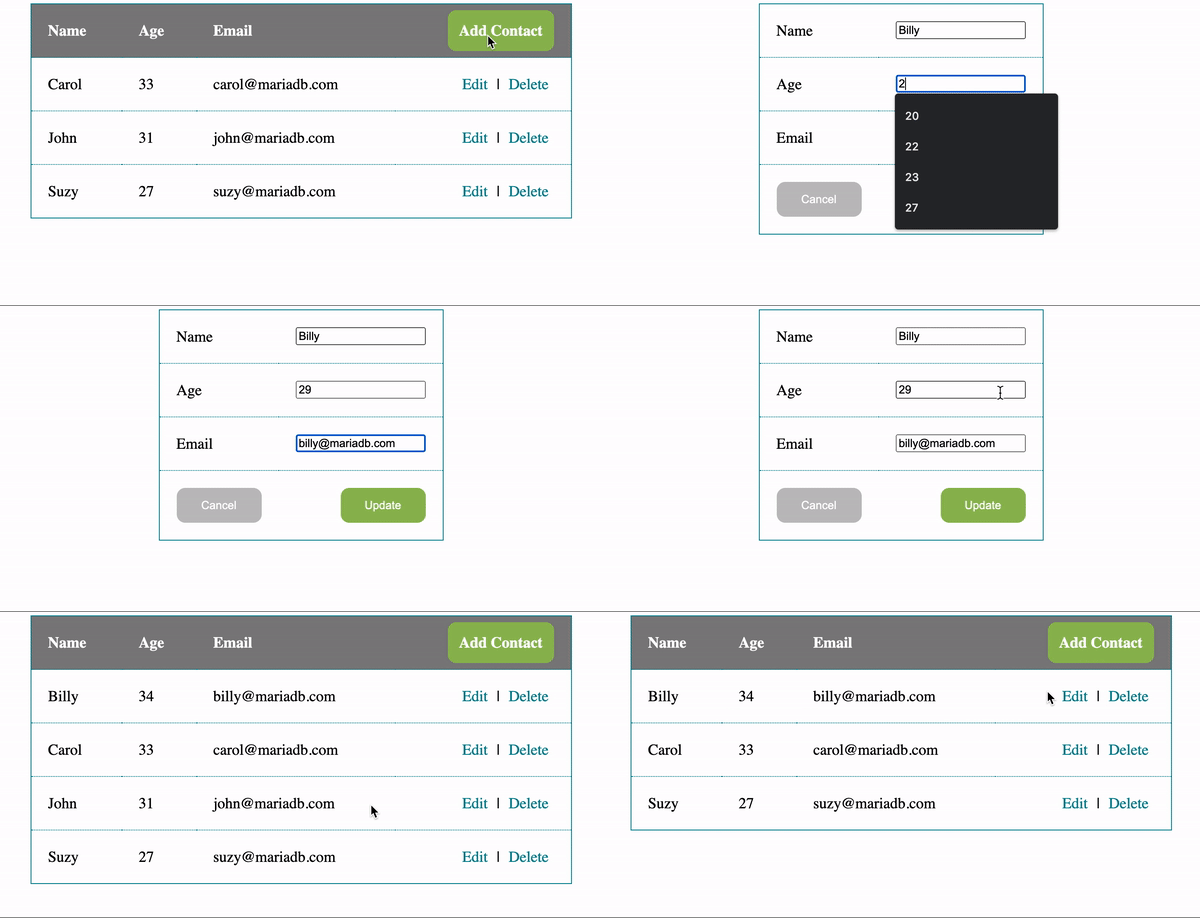 In this article I’m going to highlight some of the fundamental details of using PDO to connect to and communicate with a MariaDB database. Everything I’ll be exploring is based on the code for the Rolodex application, and if you’d like to dive into the code you can check it out here.
Preparing the database
Before jumping into the code for the application it’s important to note that it uses a single database calledrolodex.
CREATE DATABASE `rolodex`;The
rolodex database contains a single table, contacts, that is used to store basic information.
CREATE TABLE `rolodex`.`contacts` (
  `id` INT(11) NOT NULL AUTO_INCREMENT,
  `name` VARCHAR(100) NOT NULL,
  `age` INT(3) NOT NULL,
  `email` VARCHAR(100) NOT NULL,
  PRIMARY KEY  (`id`)
);
The SQL necessary to run the Rolodex application can be found in the schema.sql file.
Configuring the application
To facilitate the use of a MariaDB database within the Rolodex PHP application I’ve created a new file called config.php that contains the configuration settings and database connection object that can be reused across PHP pages. Connecting to and communicating with an underlying MariaDB database is facilitated by the PDO extension.config.php
<?php

$dsn = "mysql:host=<insert_host_address_here>;dbname=rolodex;charset=utf8mb4";

$options = [
  PDO::ATTR_EMULATE_PREPARES   => false, // Disable emulation mode for "real" prepared statements
  PDO::ATTR_ERRMODE            => PDO::ERRMODE_EXCEPTION, // Disable errors in the form of exceptions
  PDO::ATTR_DEFAULT_FETCH_MODE => PDO::FETCH_ASSOC, // Make the default fetch be an associative array
];

try {
  $pdo = new PDO($dsn, "<insert_user_here>", "<insert_password_here>", $options);
}
catch (Exception $e) {
  error_log($e->getMessage());
  exit('Something bad happened');
}

?>
Within the config.php file I’ve started by defining variables that hold the host address, username, password and default database that are used to create a new PDO connection object, which contains a variety of configuration options that you can use to tailor to your environment.
Executing SQL
Using, and reusing, thePDO connection within config.php is as easy as including it within a PHP code block on another PHP page.
<?php
// Include the database connection file
include_once("config.php");
...
?>
Then, with an established connection, you have the ability to use a plethora of capabilities from the PDO extension, including executing queries using PDO::query. Note that I’ve also demonstrated how you can map the results directly into a class called Contact.
<?php
// Include the database connection file
include_once("config.php");

// PHP class
class Contact {
      public $id;
      public $name;
      public $age;
      public $email;
}

// Fetch contacts (in descending order)
$contacts = $pdo->query( "SELECT * FROM contacts ORDER BY id DESC")->fetchAll(PDO::FETCH_CLASS, 'Contact');
?>
Selecting contacts using PDO::query
Or, in the case that you need to handle dynamically inserted parameter values, you can use PDO::prepare.Inserting data
$stmt = $pdo->prepare("INSERT INTO contacts (name,age,email) VALUES(?, ?, ?)");
$stmt->execute([$name, $age, $email]);
Inserting contacts using PDO::prepare
Updating data
$stmt = $pdo->prepare("UPDATE contacts SET name = ?, age = ?, email = ? WHERE id = ?");
$stmt->execute([$name, $age, $email, $id]);
Updating contacts using PDO::prepare
Deleting data
$stmt = $pdo->prepare("DELETE FROM contacts WHERE id = ?");
$stmt->execute([$id]);
Deleting contacts using PDO::prepare
As you can see, getting started with PDO and MariaDB is easy, but we’ve only scratched the surface of what’s possible. If you’d like to see for yourself what else is possible with PHP and MariaDB, start by checking out the full source code for the Rolodex application in the new PHP Data Object Quickstart GitHub repository.