Enhancing the throughput for replicating database transactions is a key concern for a MariaDB replica, as the number of transactions to replicate often arrive in large batches. One of the most significant opportunities for enhancing this performance is the ability to execute different transactions in parallel. Where the MariaDB server has featured parallelization with data-stream granularity since version Community Server version 10.0.5, command-line event replay via piping the mariadb-binlog client’s output to the mariadb client was not possible until version 10.9.1.
This blog post showcases how to parallelize replication event replay on the command-line using the domain id of a Global Transaction IDentifier (GTID). Specifically, we leverage the new GTID filtering features added to the mariadb-binlog client in MariaDB Community Server 10.9.1 (MDEV-20119) to extend the command-line replica introduced in the previous blog post to parallelize event replay at the data-stream level. To recap the previous post, we highlighted three new options to mariadb-binlog introduced in MariaDB Community Server 10.8.1, –start-position, –stop-position, and –strict-mode, to build a serial, asynchronous command-line replication client (learn more about these options in our knowledgebase). In addition, it provided a background of GTIDs and summarized the following three main benefits of their usage:

- Using GTIDs to represent replication state allows for explicit crash safety and easy server topology changes.
- Replay consistency can be validated by ensuring that sequence numbers are monotonically increasing within a given domain.
- Event execution can be parallelized at the domain-level, as independent data streams can be tagged with different domain ids.
Background: Domain-Level Parallel Replication
To effectively take advantage of parallelization, the dependence between the transactions must be well understood to avoid data inconsistency. That is, if future transactions rely on data from previous transactions, the order in which they are committed must be preserved. The domain id within a GTID identifies a unique sequence of transactions whose inter-dependence is fully captured. That is, because the sequence number of a GTID identifies the logical order in which the transaction was applied within a domain, a transaction can safely be applied as long as the last applied transaction within that domain has a lesser sequence number. In other words, transactions within one domain only depend on previous transactions from the same domain; not transactions from other domains. This principle allows transactions from different domains to safely be applied concurrently, provided the ordering of commits is maintained within a domain. An important note is that the assignment of a transaction’s domain id is left to the user, there is no automatic analysis which categorizes transactions into independent data streams.
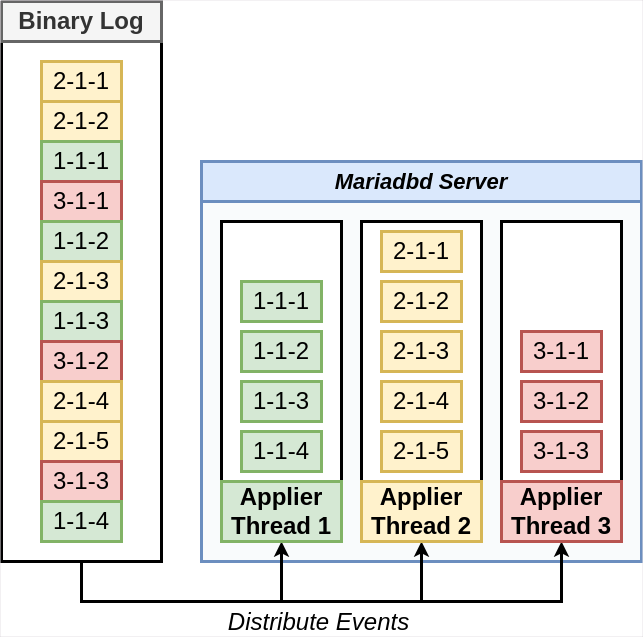
Figure 1: Concurrent application of a binary log’s events, such that each transaction is mapped to a thread based on its domain id
Figure 1 visualizes the distribution of a binary log’s transactions, each marked with a GTID, to different threads which apply the transactions from different domain ids concurrently. That is, using the binary log from the previous blog post, we show how events from three different domains can be mapped to specific threads that will execute its domain’s transactions. Within a domain, the execution of each transaction is performed in order of GTID sequence number, in order to preserve the order they were originally committed. Domain 1 is represented by the green boxes, and has four events which are to be executed by thread 1. Domain 2 is represented by the yellow boxes, and has five events to be executed by thread 2. Domain 3 is represented by the red boxes, and has three events to be executed by thread 3.
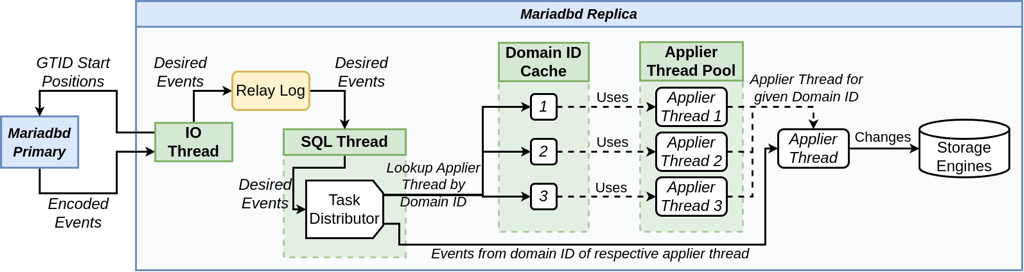
Figure 2: Domain-level parallel replication infrastructure inside a mariadbd instance
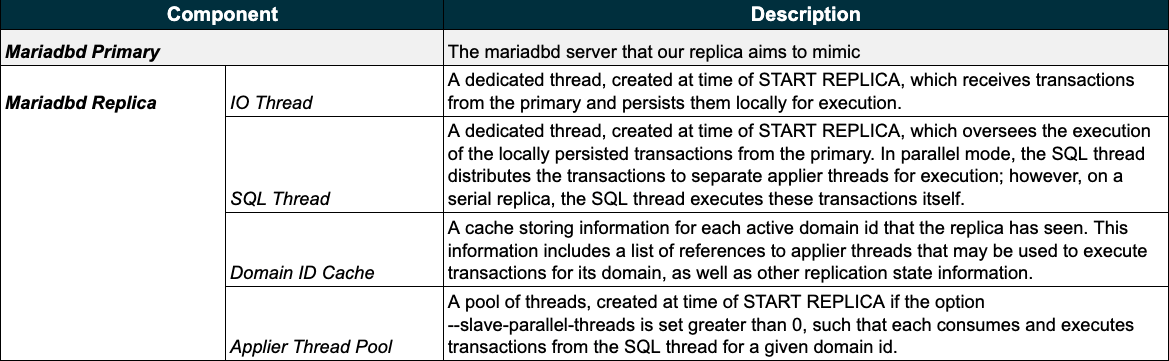
Figure 2 depicts the internal replication workflow to showcase how event execution is parallelized at the domain-level within a MariaDB replica (note that it extends the replication workflow diagram from the previous blog post). This process consists of five components, with each formatted in bold text in the figure, and listed with descriptions in the following table (table 1). Note that to enable parallel replication on a replica, all one must do is set the global variable slave-parallel-threads to a value greater than 0.
Table 1: Descriptions for the components involved in the parallel replication workflow of figure 2
The Mariadbd Primary is the MariaDB daemon process whose state the replica aims to mimic. We separate the Mariadbd Replica (blue box on the right), into four sub-components: the IO Thread, the SQL Thread, the Domain ID Cache, and the Applier Thread Pool. The IO thread starts the replication process with a request to the primary server for events after its current GTID state. After receiving them, the IO thread decides which events should be replicated and buffers them into its local relay log. The SQL thread distributes these buffered events to applier threads using the domain id cache and applier thread pool. That is, the domain id cache maps domain ids to specific applier threads that should be used to execute that domain’s events (note that despite the figure depicting this relationship as one-to-one, in reality, a domain can have multiple associated threads, configured by the option –slave-domain-parallel-threads). The applier thread pool provides the threads to execute events, where each thread maintains its own private queue of events to execute (note that the number of threads available in this pool is configurable by the parameter –slave-parallel-threads). The SQL thread then distributes the buffered events by first extracting the domain-id from each event’s GTID, querying the domain ID cache for the applier thread to send the event, and lastly adding the event to the thread’s private event queue. When an applier thread receives an event, it will execute it concurrently amongst the other applier threads, each potentially executing its own transactions, and propagate the data changes into the server’s local storage engines. To contrast the differences in this figure to the replication workflow diagram from part one of this blog series, the role of the SQL thread has changed from directly executing events, to distributing them to various applier threads using the domain id cache and applier thread pool. Where the above infrastructure is accurate up to the current release of MariaDB Community Server at the time of this writing, i.e. 11.1.1, note that there are discussions to improve this design to optimize load balancing between applier threads. To learn more, please refer to MDEV-16404 and its subtasks.Parallelizing Event Execution on the Command-Line
Figure 3: Serial command-line replication client (established in the previous post)
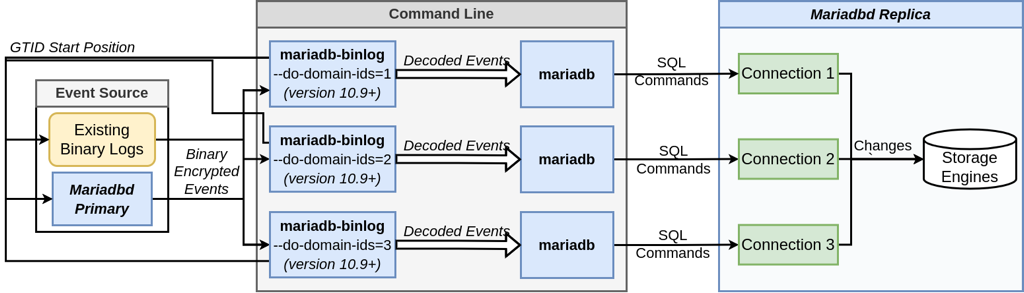
To execute replication events in parallel using the command-line, we begin with the workflow established in the last blog post of this series, and is shown in figure 3. To summarize, the command-line tool mariadb-binlog is used to receive the events from a running server (our primary) or binary log, and decode them into plaintext SQL commands. These commands are then piped into the mariadb client and executed on the target server. The event recorder introduced in the previous blog post is omitted for brevity’s sake, yet can easily be added back in using command substitution. For a more detailed explanation of this starting command, as well as alternative connection options and installation details, please refer to the previous post. To parallelize event execution, we rely on the new domain-id filtering options added into mariadb-binlog with the release of MariaDB Community Server 10.9.1. That is, the new options –do-domain-ids and –ignore-domain-ids can be used to divide the events inside a binary log, which may contain GTIDs from different domains that are interspersed non-deterministically (shown by the binary log in figure 1), into independent event streams. By piping these independent event streams into different, concurrent invocations of the mariadb command-line client, parallel event replay can be achieved. This is due to the fact that each invocation of the mariadb client process will create a new connection thread on the target server, allowing each connection to operate in parallel.
Figure 4: Parallelizing the command-line execution of binlog events using the mariadb-binlog and mariadb interfaces
Figure 4 presents the workflow that our command-line replica will use to replay events in parallel. The key idea is to fork the command-line process pairs, mariadb-binlog and mariadb, from the serial command-line replica introduced in the previous blog post, such that each pair works on an independent data stream, filtered by domain id; and executes its events on a unique connection to the replica. More specifically, we use mariadb-binlog to filter events by domain id, either with –do-domain-ids or –ignore-domain-ids, and pipe these filtered events into a unique invocation of the mariadb command-line client for execution. An important observation in our command-line replica is that there is no event distribution, as is done by the SQL thread. Rather, each fork polls for events directly from the event source, and is itself responsible for deciphering which events to apply.The Implementation
As the underlying strategy of our parallelization is to repeatedly fork the command line processes mariadb-binlog and mariadb with different domain id filtering parameters, we begin with a serial invocation to isolate a single data stream. We will start with the same initial command as the last post; however, instead of specifying our connection parameters on the command line, this time we will use a configuration file. This will help avoid redundant option specifications later when we extend the command to execute transactions in parallel. Learn more about configuration files in our knowledgebase and documentation.[mariadb-binlog] read-from-remote-server stop-never socket=/tmp/primary.sock user=repl_user [mariadb-client] socket=/tmp/replica.sock user=data_userOur command is then shortened to the following:
mariadb-binlog $BINLOG_FILES | mariadbA few notes:
- This method of parallelizing event replay leads to redundant reading of a binary log, as each invocation of mariadb-binlog will read through the entire file. The work proposed by MDEV-4991 will help alleviate some of this redundancy. There has additionally been discussion on providing multiple output streams from a single mariadb-binlog process.
- $BINLOG_FILES is still used as an environment variable to specify the binary logs we wish to filter and replay. For example,
export BINLOG_FILES=master-bin.000001. - This command form assumes your configuration file is in a default file location. You will have to extend the commands to use the –defaults-file option otherwise.
Filtering Data Streams
Filtering by domain id can be achieved using one of two command-line parameters to mariadb-binlog: –do-domain-ids or –ignore-domain-ids. Note that in a single invocation of mariadb-binlog, only one of these options can be used at a time, not both. Our command can then be extended to resemble one of the followingmariadb-binlog --do-domain-ids=$D $BINLOG_FILES | mariadb
mariadb-binlog --ignore-domain-ids=$D $BINLOG_FILES | mariadbwhere $D is a comma-separated list of domain ids that specify either the ids to include or exclude in the pipeline, respective to the option used. For example, in a binary log that has three domain ids, 1, 2, and 3; `mariadb-binlog –do-domain-ids=1,2 $BINLOG_FILES | mariadb` .would output events coming from both domains 1 and 2, and ignore any events from domain 3. Alternatively specifying the command as `mariadb-binlog –ignore-domain-ids=3 $BINLOG_FILES | mariadb` would achieve the same result.
Parallelizing Event Execution
By co-running multiple invocations of the above command with distinct domains being output by mariadb-binlog, we can achieve the concurrent execution of events on the same mariadbd server. That is, we use the bash fork operator, &, to run each invocation asynchronously in the background of our shell, and at the end run wait to prolong the lifespan of our replica until we wish to stop it, e.g. via Control-C or running killall mariadb-binlog. Our command then resembles the following:(mariadb-binlog --do-domain-ids=1 $BINLOG_FILES | mariadb) & (mariadb-binlog --do-domain-ids=2 $BINLOG_FILES | mariadb) & (mariadb-binlog --do-domain-ids=3 $BINLOG_FILES | mariadb) & waitwhere the domain-ids used correspond to those from our binary log example in figure 1.
Additional Notes
- The parallelization within a mariadbd replica instance provides more concurrency than just at the domain-level. Learn more about this in our knowledgebase.
- Although –do-domain-ids and –ignore-domain-ids cannot be used in the same mariadb-binlog invocation, they can be combined with all combinations of the options introduced in the previous post, i.e. –start-position, –stop-position, and –strict-mode
- Replay consistency validation through the –strict-mode option only applies to events which are included by the GTID filters. This includes the new server id filtering options, –do-server-ids and –ignore-server-ids, which were also added in Community Server 10.9.1, but not covered in this post. Their underlying logic, however, is similar, in that they will either include or exclude events originating from the listed server ids.
- Because the –stop-position option implicitly undertakes filtering to only output events within its range of domains, when combined with –do-domain-ids or –ignore-domain-ids, output will consist of the intersection between the filters. Specifically, with –do-domain-ids and –stop-position, only events with domain ids present in both argument lists will be output. Conversely, with –ignore-domain-ids and –stop-position, only events with domain ids present in the –stop-position and absent from the –ignore-domain-ids options will be output
