


White paper
MariaDB & JSON: Flexible Data Modeling
01Introduction
With a history of proven reliability, relational databases are trusted to ensure the safety and integrity of data. In the digital age, where offline interactions become online interactions, data is fundamental to business success, powering mission-critical web, mobile and Internet of Things (IoT) applications and services.
The safety and integrity of data has never been more important. However, the digital age is creating new challenges. It is leading to new use cases, requiring businesses to innovate faster and developers to iterate faster – and diversity of data is expanding with increased use of semi-structured data in modern web and mobile applications.
As a result, businesses had to decide between the reliability of relational databases and the flexibility of schemaless databases. When faced with this choice, many businesses chose to deploy multiple types of databases, increasing both the cost and complexity of their database infrastructure.
With strict schema definitions and ACID transactions, relational databases ensure the safety and integrity of data. But, what if a relational database supported flexible schemas? What if a relational database could not only support semistructured data, but could enable applications to extend or define the structure of data on demand, as needed?
That’s the power of MariaDB Server, ensuring data is safe for the business while at the same time supporting schema flexibility and semi-structured data for developers. With dynamic columns and JSON functions, flexible schemas and semi-structured data (e.g., JSON) can be used without sacrificing transactions and data integrity
With MariaDB, it is now possible to:
- Combine relational and semi-structured and/or JSON data
- Query semi-structured data and/or JSON data with SQL
- Modify semi-structured and/or JSON in an ACID transaction
- Extend the data model without modifying the schema first
Benefits and Limitations
There are many benefits to using JSON, for both the business and its developers. However, there are limitations as well. In order to benefit from flexible schemas, applications must share responsibility for managing both the schema and the integrity of data.
Benefits
- Faster time to market: develop new features without waiting for schema changes
- Easier development: build applications and features using simpler data models and queries
- More use cases: support modern and emerging use cases – web, mobile and IoT
- Simpler infrastructure: use a single database for both legacy and modern applications
- Less risk: support flexible data models without sacrificing reliability, consistency and integrity
Limitations
- Functions: applications must use SQL functions to read, write and query JSON documents
- Data types: applications are responsible for managing the data types of dynamic columns
Use Cases
With JSON functions, organizations in every industry – from finance to retail – can support modern use cases for mission-critical applications, or simplify existing use cases, by combining the flexibility and simplicity of JSON with the reliability of a relational database with transactions.
- Advertising: personalization with user and visitor profiles, clickstream data, ad metadata
- Finance: customer 360 with customer accounts, financial transactions, ATM locations
- Insurance: content management with policies, applications / forms, claims
- IoT: management and monitoring with device configuration, sensor readings
- Manufacturing: inventory with bill of materials, process flows, quality control events
- Media and Entertainment: digital metadata with stream state, program guides, entitlements
- Retail: engagement with product catalogs, user sessions / cookies, purchases, shopping carts
- Transportation: asset management with fleet location, status and cargo
02JSON Functions
Applications can read, write, index and query JSON documents. There are JSON functions for
reading and writing JSON fields, objects and arrays as well as utility functions for formatting,
searching and validating JSON fields and documents.
Definitions
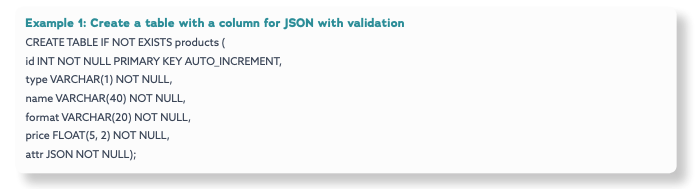
To use JSON functions, create a column for MariaDB Server to store JSON documents as plain text (e.g., VARCHAR, TEXT, etc.). In the example below, JSON will be stored in the attr column with a NOT NULL constraint. However, a NOT NULL constraint is optional. In addition, there is a CHECK constraint using JSON_VALID to ensure the attr column contains valid JSON.
Create
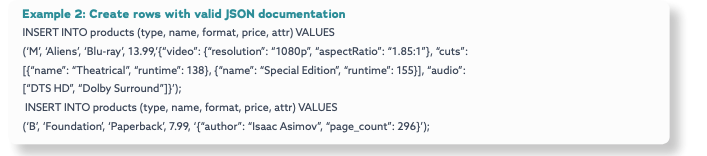
To insert a row that contains a JSON document, set the column value using the string value of the JSON document. In the example below, two products are inserted into the products table: a book (Foundation) and a movie(Aliens). While every product has a type, name, format and price, books have an author and a page count as well,while movies have audio and video properties and one or more cuts – complex fields with nested values.
Read
There are two JSON functions for reading fields within a JSON document: JSON_VALUE to read fields with simple values (e.g., strings and numbers) and JSON_QUERY to read fields with complex values (e.g., objects and arrays).
Fields
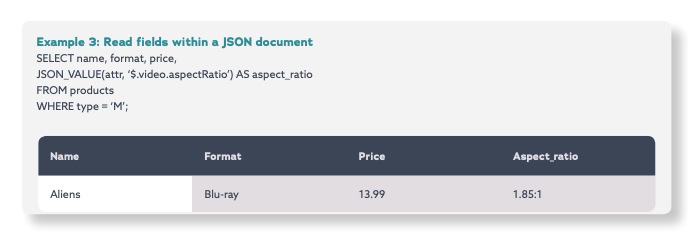
To read a simple field within a JSON document, use JSON_VALUE with the name of the column where the JSON document is stored and the path to the field. In the example below, the query returns the name, format, price and aspect ratio of movies using JSON_VALUE to read the aspectRatio field of the JSON document (stored in the attr column).
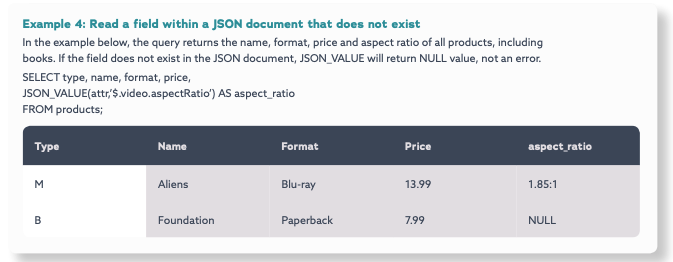
Note: Reading a field that does not exist in the JSON document
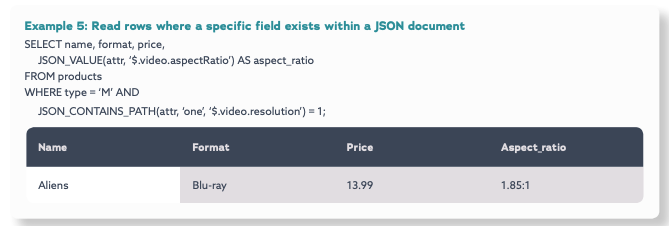
To query all rows with a where a field exists in the JSON document, in one or all paths, use JSON_CONTAINS with the name of the column where the JSON document is stored, “one” if it any path needs to exist or “all” if every path needs to exist and the path(s) to the field.
In the example below, the query returns the name, format, price and aspect ratio of all movies with a resolution -the JSON document in the attr column must contain the resolution field.
Arrays
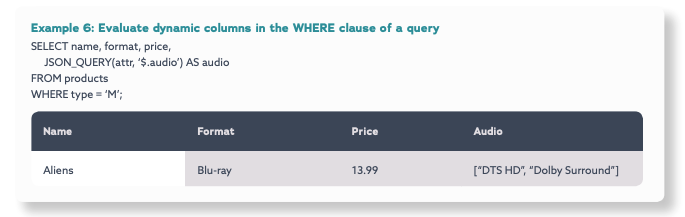
To read an array within a JSON document, use JSON_QUERY with the name of the column where the JSON document is stored and the path to the array. In the example below, the query returns the name, format, price and audio of movies using JSON_QUERY to read the audio field (an array) of the JSON document (stored in the attr column).
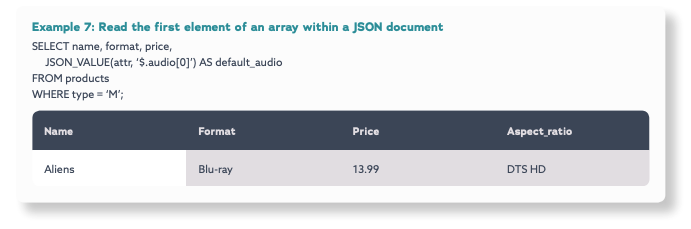
To read an element within an array based on its index position, use JSON_VALUE if the element is a string or number, JSON_QUERY if the element is an array or object. In the example below, the query returns the name, format, price and default audio of movies using JSON_VALUE to read the first element of the audio array within the JSON document (stored in the attr column)
Objects
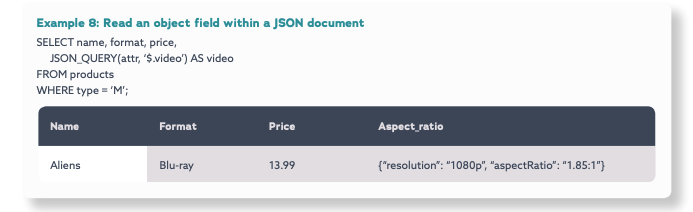
To read an object within a JSON document, use JSON_QUERY with the name of the column where the JSON document is stored and the path to the object. In the example below, the query returns the name, format, price and video of movies using JSON_QUERY to read the video field (an object) of the JSON document stored in the attr column.
Note: Reading multiple fields, arrays and/or objects within a JSON document
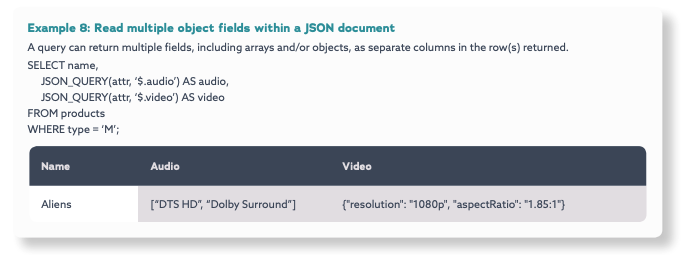
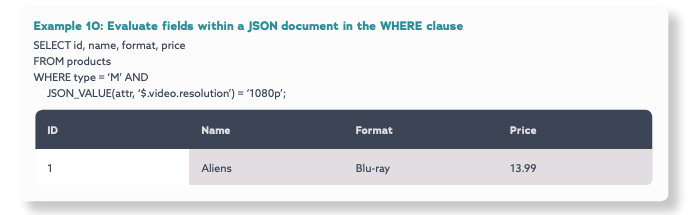
In addition, JSON functions can be used in the WHERE clause. In the example below, the query returns the id, name, format and price of all movies with a video resolution of “1080p”.
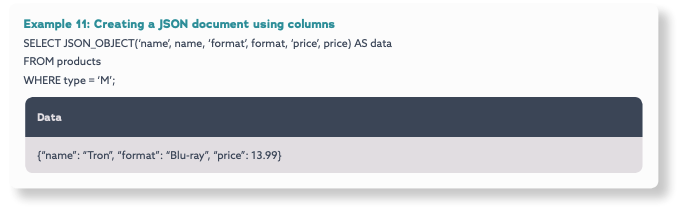
To read multiple columns as a JSON document, use JSON_OBJECT with multiple name/value pairs – the name of the field to be created in the JSON document with the column name containing the value.
In the example below, the JSON_OBJECT function is used to create a JSON document with fields for the name, format and price columns.
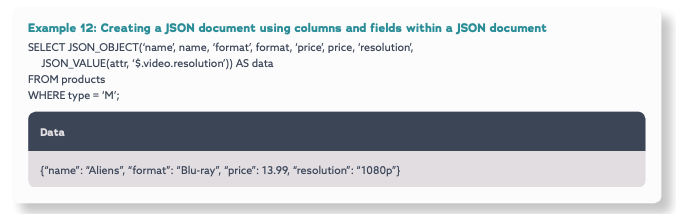
To create a new JSON document from both columns and fields within an existing JSON document, use JSON_OBJECT with multiple name/value pairs – the name of the field to be created and either a column name or the path to a field within a JSON document. In the example below, the JSON_OBJECT function is used to create and return a new JSON document with fields for the name, format and price columns and the resolution field within the JSON document (stored in the attr column).
Warning: Creating a new JSON document with fields containing arrays and/or objects
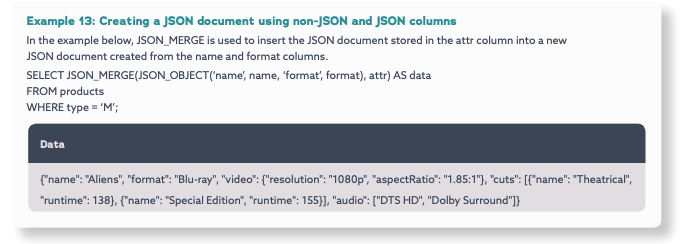
JSON_OBJECT will convert the value of every field into a string. It should not be used to create a JSON document with fields containing array or object values. However, JSON_MERGE can be used create a new JSON document by merging fields, includes fields with array or object values, from an existing JSON document.
Tip: Creating a new JSON document by merging an existing JSON document
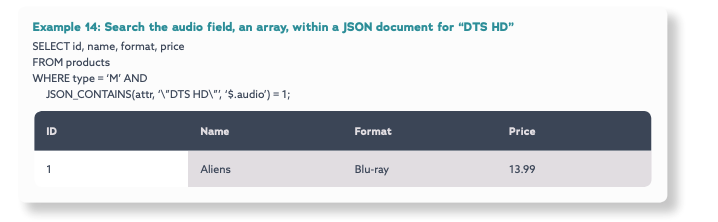
To search for a value within a JSON document, use JSON_CONTAINS with the name of the column where the JSON document is stored, the value and, optionally, the path to a specific field to search in. In the example below, the JSON_CONTAINS function is used to search the JSON document of movies for “DTS HD” in the audio field, an array. Note, the double quotes have to be escaped in this example.
Indexes
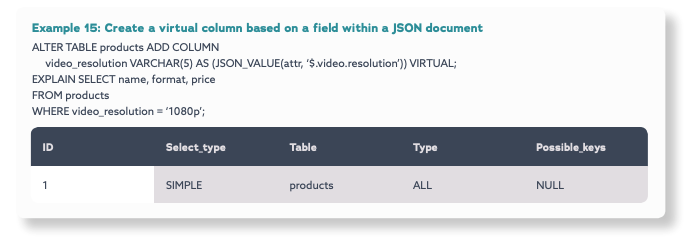
It is not possible to create an index on a JSON field. However, it is possible to create a virtual column (i.e., generated column) based on a JSON function, and to index the virtual column. A virtual column can be PERSISTENT or VIRTUAL. If a virtual column is VIRTUAL, its data is not stored in the database / written to disk.
In the example below, a virtual column, video_resolution, is created based on the value of the resolution field of the JSON document (stored in the attr column).
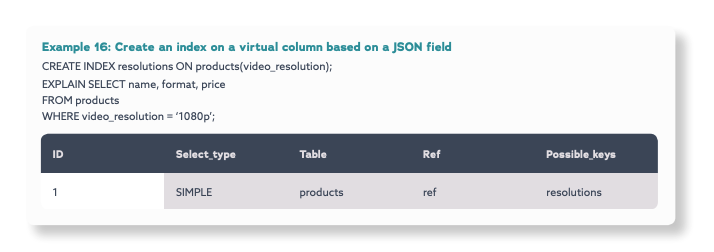
However, in the example above, per the explain plan, an index will not be used for the query because an index has not been created on the virtual column. In the example below, an index, resolutions, is created on the virtual_resolution virtual column (based on the resolution field within the JSON document stored in the attr column), and per the explain plan, the query will use the index.
Update
There are separate JSON functions to insert and update fields within JSON documents: JSON_INSERT to insert,
JSON_REPLACE to update and JSON_SET to insert or update.
Fields
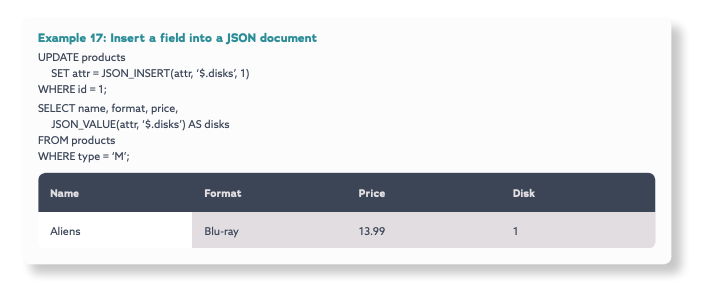
To insert a field within a JSON document, use JSON_INSERT with the name of the column where the JSON document is stored, the path of where to insert the field and the value of the field. In the example below, the field disks is inserted into a JSON document with a value of 1.
Arrays
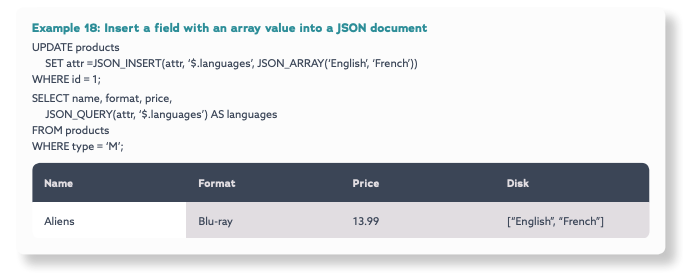
To insert a field with an array value into a JSON document, use JSON_INSERT with the name of the column where the JSON document is stored, the path of where to insert the field and, using JSON_ARRAY, the array value. In the example below, a new field, languages, is inserted in a JSON document.
The value is an array with two elements: English and French.
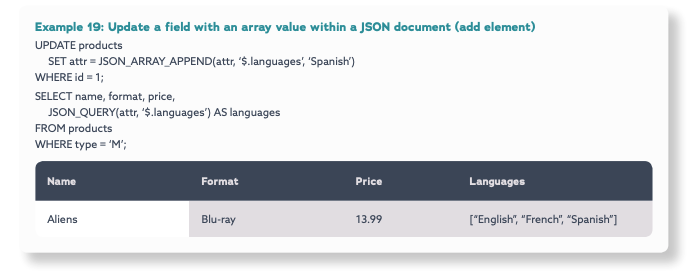
To insert an element into the array value of a field within a JSON document, use JSON_ARRAY_APPEND with the name of the column where the JSON document is stored, the path to the array and the element to be inserted into the array value. In the example below, “Spanish” is added to the languages array
To remove an element from an array within a JSON document, use JSON_REMOVE with the name of the column where the JSON document is stored and the path to the array with the index position of the element to remove. In the example below, “English” is removed from array value in the the languages field.
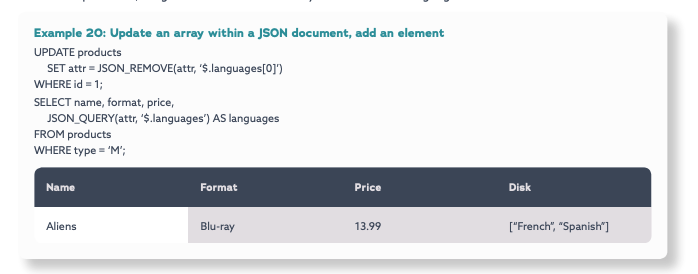
Note: JSON_REMOVE can be used to remove any field.
Data Integrity
While applications control the structure of JSON documents, data integrity can be enforced by the database using CHECK constraints, introduced in MariaDB Server 10.2, with JSON functions. In the example below, a CHECK constraint is created to ensure movies have a video resolution and aspect ratio, at least one cut and at least one audio while books have an author and page count. The constraint ensures these fields exist, but it does not prevent the application from creating new fields.
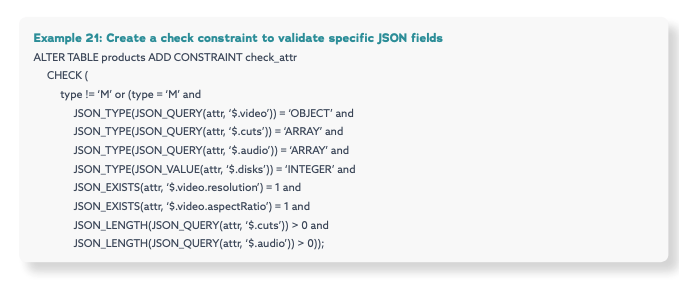
In the example below, the INSERT fails and returns an error because it was for a movie without a resolution – it violated the CHECK constraint the resolution field was missing

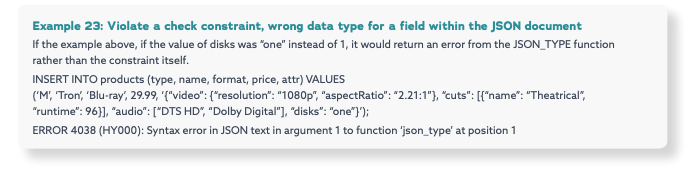
Warning: JSON fields with the wrong data type
Fill in the form to read the rest
03Conclusion
MariaDB Server, with dynamic columns and JSON functions, enables businesses to use a single database for both structured and semi-structured data, relational and JSON, together. It is no longer necessary to choose between data integrity and schema flexibility. When dynamic columns are used, a flexible schema can be created with a relational data model – without sacrificing data integrity, transactions and SQL.
MariaDB Server is a trusted, proven and reliable database, and with support for flexible schemas and semistructured data, including JSON, it meets the requirements of modern, mission-critical applications in the digital age – web, mobile and IoT.
MariaDB Server helps business and developers save time and money by:
- Developing new features without waiting for schema changes
- Developing applications with simpler data models and queries
- Supporting current and future use cases – web, mobile and IoT
- Supporting both legacy and modern applications
- Supporting flexible data models without sacrificing data integrity