


White paper
The Ultimate Guide to High Availability with MariaDB
01Introduction
Many businesses want databases with high availability but struggle to realize cost-effective and straightforward high availability. Instead, many teams find themselves working with a complex web of third-party tools and cost-prohibitive database instances to achieve the right level of availability.
MariaDB is a robust, mature, fully integrated transactional database system for enterprise production workloads. With transaction-safe, ACID-compliant features, such as row-level locking, crash recovery, transaction commit and rollback, MariaDB databases provide unmatched high performance, scalability and data integrity. It keeps production systems running efficiently with various workloads, use cases and environments. MariaDB databases can integrate into any existing environment: on-premises data centers, containers and all cloud deployments for true freedom to deploy data anywhere without vendor lock-in.
MariaDB Enterprise Server makes it easier and more cost-effective for businesses to enable high availability with robust baseline features such as built-in primary/replica replication, pluggable storage engines for flexibility, hot online non-blocking backups and 24/7 support.
While these baseline features provide the essentials for standing up a high availability environment, our advanced MariaDB MaxScale database proxy takes MariaDB Enterprise Server a step further. MaxScale completes the high availability picture with unmatched scalability, failover support and powerful integrations – all without the hassle and high costs of adding on third-party solutions.
02Designing for High Availability
High availability database management made simple with MariaDB Enterprise Server and MaxScale.
Designing a highly available database architecture involves redundancy, fault tolerance, automatic failover mechanisms and rapid recovery procedures to maintain continuous availability and reliability of the data. You can achieve much of this with a MariaDB primary system and multiple MariaDB replica servers on separate hardware servers across multiple sites, along with regional data centers with dedicated, fast and reliable networks. However, an essential component of every best practice for high availability with MariaDB includes MariaDB Enterprise Server with MaxScale. For a more detailed explanation of this and other best practice architectures, see the MariaDB High Availability Architecture Choices section at the end of this document.
MariaDB MaxScale is an advanced database proxy that enables high availability, scalability, security and integration services for MariaDB Enterprise Server. MaxScale provides the critical elements for high availability with automatic, smart failover, rapid recovery and a transparent, smooth experience for responding to failures and issues at the application layer. It also abstracts away the underlying database infrastructure, simplifying application development and database administration for both developers and database administrators (DBAs).
In this section, we’ll dive into MaxScale’s high availability features and architectures, covering why they matter for today’s fast-paced businesses
Advanced Automatic Failover and Switchover Support
MaxScale’s smart, automatic failover orchestrates primary and replica databases transparently to applications, with automatic promotion and connection migration in the event of a failure or outage. With advanced connection pooling capabilities, failover- or administrator-initiated switchovers keep users’ transactions connected and running on the active databases behind the scenes in the case of a primary and replica status change.
By providing automated orchestration, cooperative locking and other near-instantaneous features, MaxScale makes failovers and outages transparent to the customer, ensuring that their sessions are not interrupted by failovers or outages. It includes all of these features without requiring third-party add-ons, making it far easier for admins to maintain these failover controls.
Zero-interruption automatic failover and connection and session failover
Any database architecture is vulnerable to planned outages and unexpected failures. Designing a highly available architecture automates failover/switchover to healthy database nodes and does so without any impact to the application. This means that even if something is happening at the database layer – whether unexpected or expected such as rolling upgrades to the database – customers will continue to have a great experience and business will continue as usual.
In a traditional MariaDB architecture with MaxScale, a primary and two replica nodes, failover automatically kicks in and promotes the most eligible replica if the primary database instance goes down. This orchestration happens behind the scenes seamlessly with little to no delay. MaxScale migrates queries to this new database once the new primary is online.
Configuring Automatic Failover
With a primary and a minimum of two replica MariaDB databases, at least one MaxScale node must be installed and configured on a shared-nothing architecture separate from the databases. To set up your MaxScale instances, follow these step-by-step instructions.
After setting up the MaxScale user and replication user permissions in the database, define the MariaDB database servers in the configuration file with the following format:
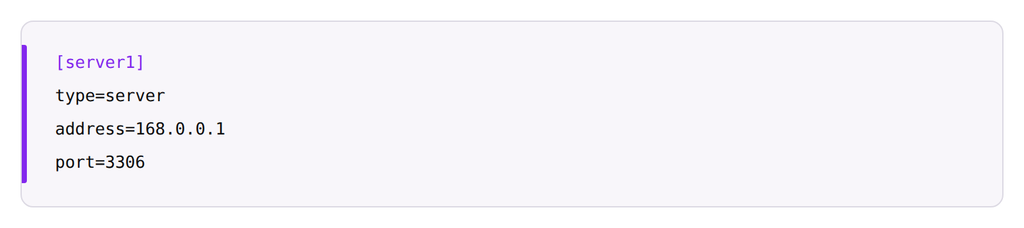
Automatic failover can be enabled under the MariaDB Monitor within MaxScale.
Then simply add auto_failover=true to the monitor section in the configuration file. For fully automatic orchestration, also add auto_rejoin=true. With this setting, when a failed/offline node comes back online, MaxScale will automatically configure replication on that node so that it is a replica of the current primary server.
With automatic failover and automatic rejoin enabled, the monitor section of the MaxScale configuration should look like this:
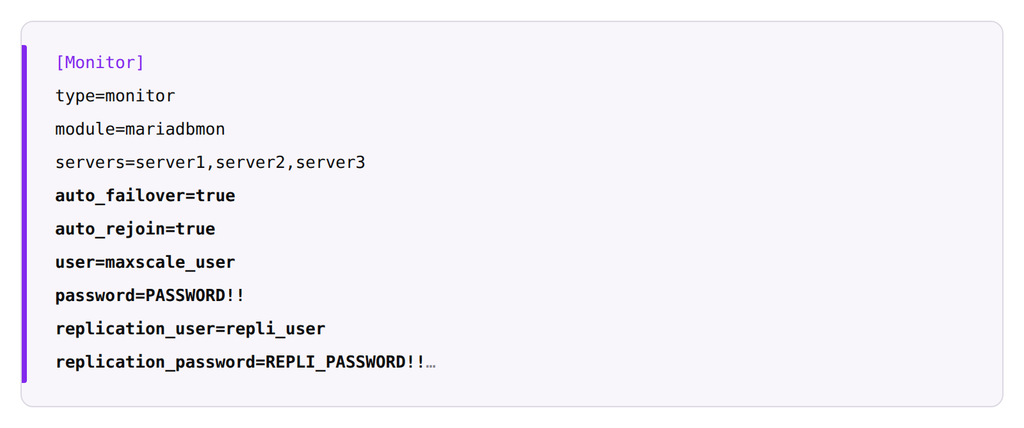
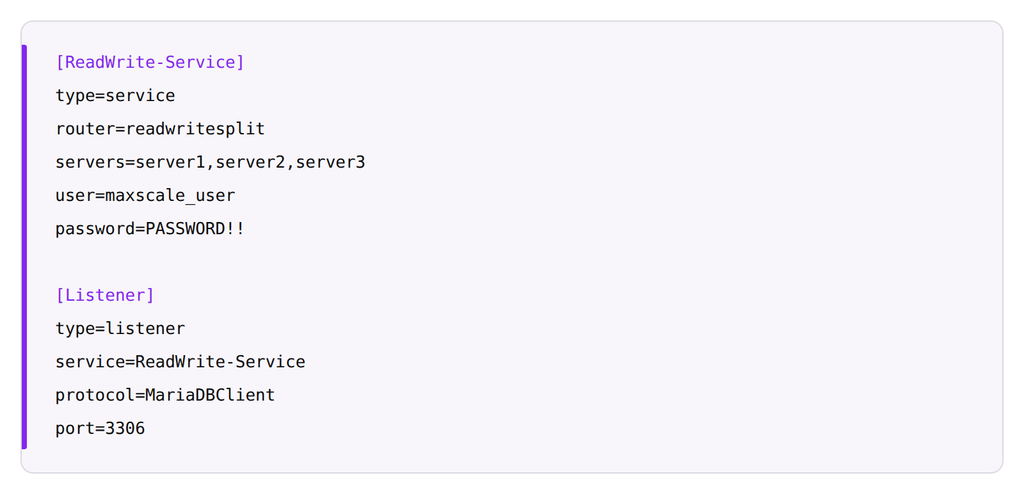
Also define the routing service and listener sections:
When everything is running fine, the cluster state looks like this:
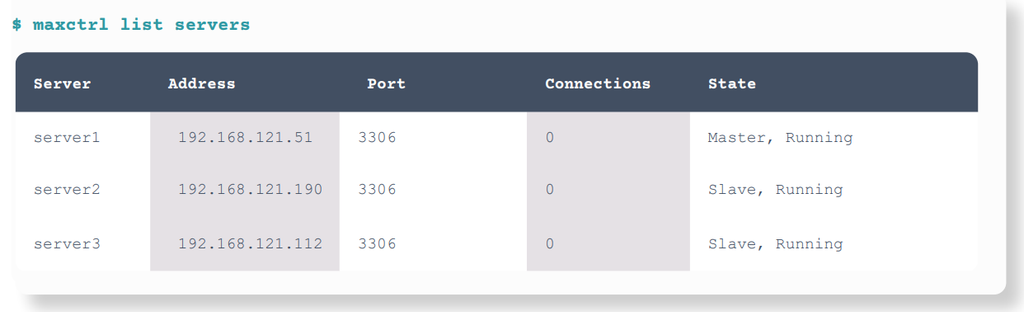
If server1 goes down, failover will automatically be performed and an existing replica promoted as a new primary.
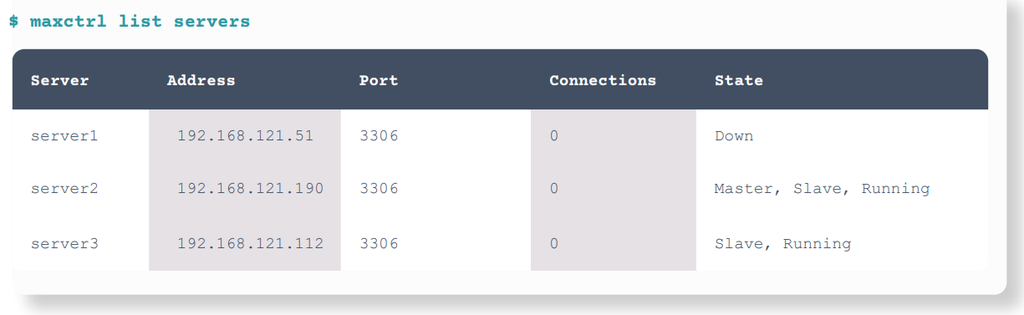
See our video for a more detailed demonstration and instructions on replicating this failover.
Learn more about enabling automatic failover with MariaDB Monitor and MaxScale.
Configuring Transparent, Zero-Interruption Connection, Session and Transaction Failover
MaxScale leverages the following features to facilitate a seamless, transparent failover:
- Connection migration: MaxScale facilitates connection pooling in the background, enabling connection migration to happen automatically in the unlikely event of the primary database server failing. Otherwise, the application’s connection would be closed, and the user would need to reload.
- Session restore: MaxScale restores the session to its previous state on the new primary when an automatic failover occurs. The failover is transparent to the application, ensuring that users don’t lose their session and need to restore it manually.
- Transaction replay: If an automatic failover occurs mid-transaction, this feature replays the transaction on the new primary database server. As a result, the user does not have to reissue the command after the failover occurs.
To enable these features, some parameters need to be set in a read-write split service configuration.
master_reconnection
When this is set to true, MaxScale can change a primary service mid-session without closing the connection or sending an error to the application.
master_failure_mode
For seamless connection migration, set this to fail_on_write when master_reconnection is enabled. When this happens, fail_on_write will failover to a new primary when a write command is issued from the connection.
transaction_replay
When this parameter is enabled, transactions will be replayed on a new primary if they are interrupted by a failure. With the session command history automatically stored by MaxScale, this setting will also restore any session settings to their previous state on the new primary before replaying the transaction.
Added to the read-write splitter service should look like this:
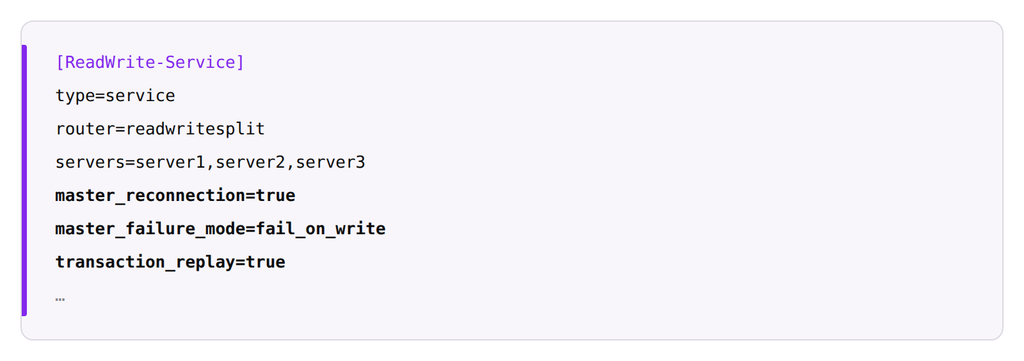
To use transaction_replay, disable_sescmd_history must not be enabled. Learn more about connection migration with MariaDB MaxScale and more about configuring transaction replay
Delayed Retries
Instead of immediately returning an error to the client, MaxScale can delay failed queries until a primary is available, making for a more seamless user experience. The router automatically retries the query if a different server becomes available before timeout is reached.
Configuring Delayed Retries for Failed Queries
Configure delayed retries for failed queries by configuring two parameters for the Read/Write Split Router in maxscale.cnf.
delayed_retry
This will delay the return of a failed query error to the client or application until a different server becomes available or the delayed_retry_timeout is reached.
delayed_retry_timeout
The maximum amount of time to wait until returning an error if a query fails. (The value can be followed by any of the following units: h, m, s, and ms, for specifying durations in hours, minutes, seconds, and milliseconds.)
For example:
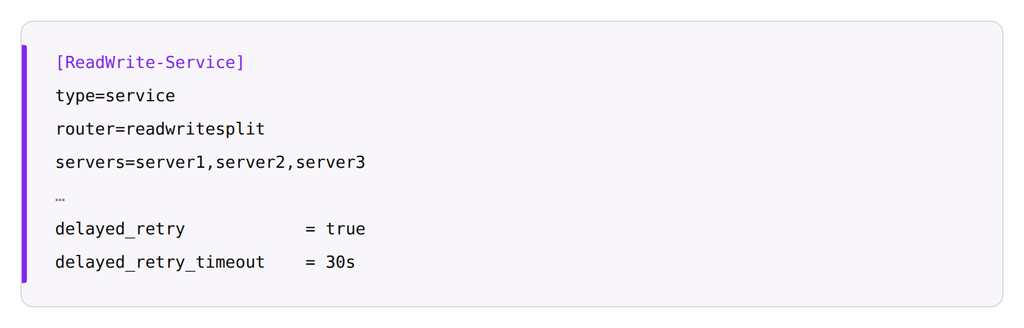
Learn more about configuring delayed retries
Cooperative Monitoring
To eliminate single points of failure, multiple MaxScale nodes can be concurrently implemented. The cooperative monitoring lock ensures a single MaxScale node is set as active to perform orchestration. It allows multiple MaxScale nodes to work together without conflict.
While other databases require third-party add-ons to enable this type of orchestration – a complex setup to install and maintain – MaxScale includes cooperative locking. Cooperative locking automatically assigns an “active” MaxScale, which holds the “lock” and exclusive role of the database orchestrator. If this “active” MaxScale fails, another MaxScale in the cooperative pool acquires the lock and becomes the new “active” server. This architecture makes it far easier for admins to manage failovers, as it transfers the lock automatically
Configuring Cooperative Locking
Configure cooperative locking by enabling the cooperative_monitoring_locks parameter for the MariaDB Monitor in maxscale.cnf. It has several possible values.
cooperative_monitoring_locks
none: Do not use any cooperative locking. (Default)
majority_of_all: Primary monitor node requires locks on a majority of all servers configured, even those which are
down. (Recommended)
majority_of_running: Primary monitor node requires locks on a majority of running servers.
For example:
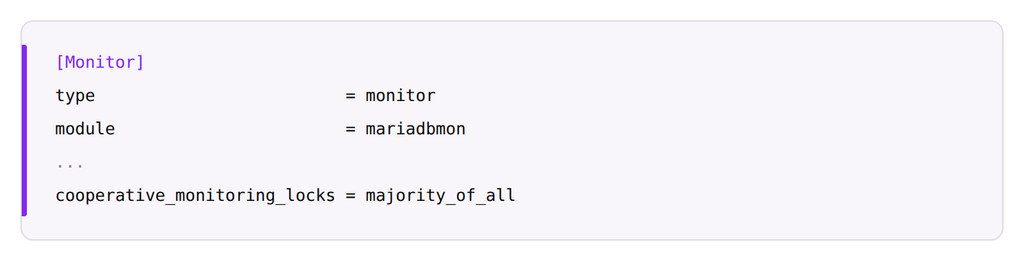
Learn more about configuring cooperative locking.
With two or more MaxScale nodes, applications should be directed to only active, online MaxScale nodes. This can be achieved in the connection string to MaxScale. The JDBC Connector/J is one of the most commonly used and has connection failover built into the connector.
Sequential
By using the sequential option, connections will be directed to the first MaxScale-Host1 until it is unavailable. When that node is unavailable, the connection will fail to the secondary host – MaxScale-Host2. As soon as MaxScale-Host1 is available again, the connections will return to the first MaxScale.
Loadbalance
The loadbalance option will distribute the connections between both MaxScale nodes and fail to the active online node if the other node goes down
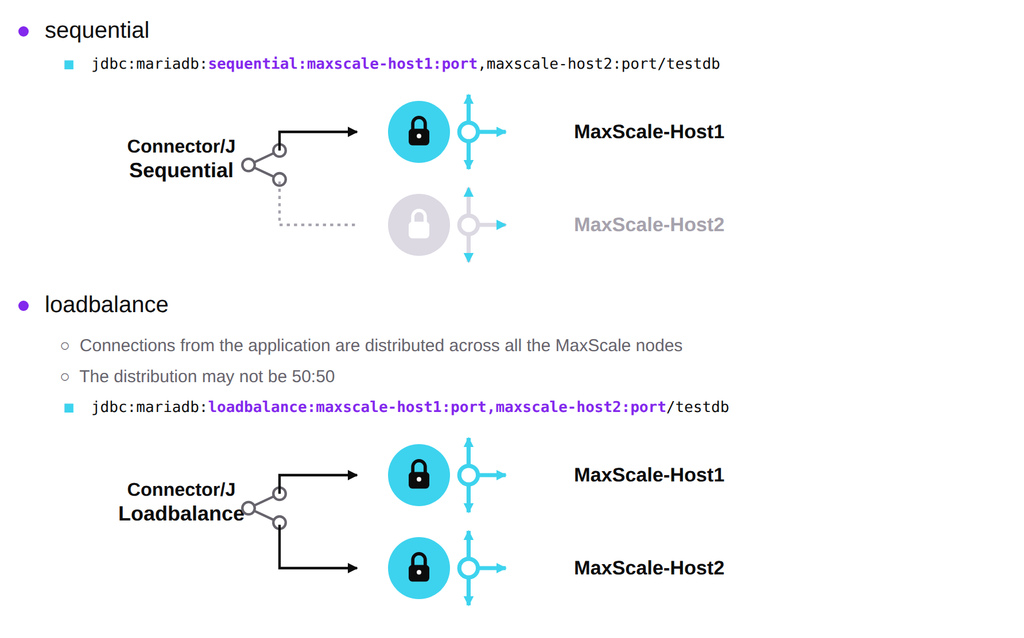
Get more information on using the Connector/J for failover. Other connectors can also be used for this purpose. Our team can provide guidance on getting started – contact us for assistance.
Read/Write Split Router
MaxScale also includes a Read/Write Split Router, a SQL-aware load balancer that performs automatic read/write splits. With minimal configuration, the Read/Write Split Router intelligently interprets incoming SQL queries, efficiently sends reads to replicas, and writes to primary databases, allowing effortless and transparent read scaling.
With the Read/Write Split Router, it’s simple for admins to scale reads as they scale up their database environments. In the case of a database failure, the router can automatically reconnect existing client connections to the new primary server. Users can also enable causal reads with the router (see next section).
Configuring the Read/Write Split Router
1. Configure the service
2. Configure the listener
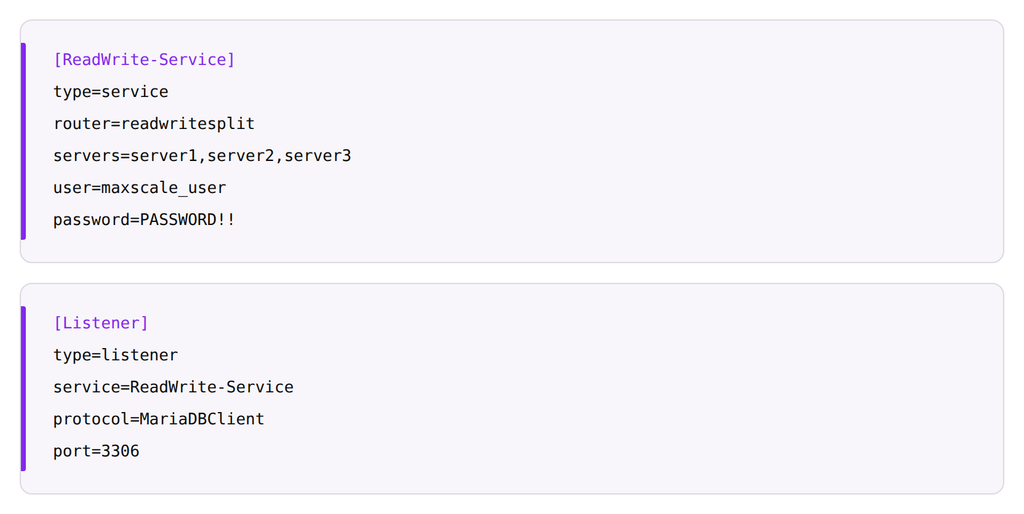
Learn more about read-write splitting with MariaDB MaxScale.
Causal Reads
The MaxScale Read/Write Split Router distributes read queries between replicas, allowing for read scalability. However, some read queries depend upon the immediate write executed before that read. With causal reads enabled, MaxScale ensures the write value is visible to that read.
With the local or global setting enabled, MaxScale is aware of the related write command issued before the read or select statement dependent on that data. MaxScale will wait for that write to fully replicate before executing the read or select statement. This ensures the data returned is up to date and accurate.
Configuring Causal Reads
To enable causal reads on all MariaDB servers used by MaxScale, three parameters need to be set: MariaDB database configuration requirement:
session_track_system_variables
For causal reads, this system-level variable needs to be enabled to last_gtid, so that the server will track session-level changes to the value of the last_gtid system variable. This is a system-level variable set in [mariadb] or [server].
For example, in the configuration on the MariaDB database server:

MaxScale configurations:
causal_reads
none: Causal reads are disabled. (Default)
local: Writes are only visible locally to the connection that performs it. Unrelated modifications done by other
connections are not visible. This mode improves read scalability at the cost of latency and reduces the overall
load placed on the primary server without breaking causality guarantees.
fast: Similar to local, but does not wait for a replica server to catch up, but will read from the primary instead.
global: Writes are visible globally to all connections. This can be slower than local mode.
fast_global: Similar to fast and global, this setting will use global GTID writes and will not wait for replicas to
catch up. It will read from the primary server if the write is not on the replica servers.
universal: Guarantees that all SELECT statements always see the latest observable transaction on the database
cluster. This is the most consistent of all modes but is vulnerable to added network latency between MaxScale
and extra load on the primary database server.
fast_universal: A mix of fast and universal settings. This still has the highest consistency but with the most load
on the primary.
NOTE: Connector/J loadbalance option is only compatible with universal and fast_universal configurations.
causal_reads_timeout
The timeout for the replica synchronization is to be completed by causal_reads in seconds. Default: 10 seconds.
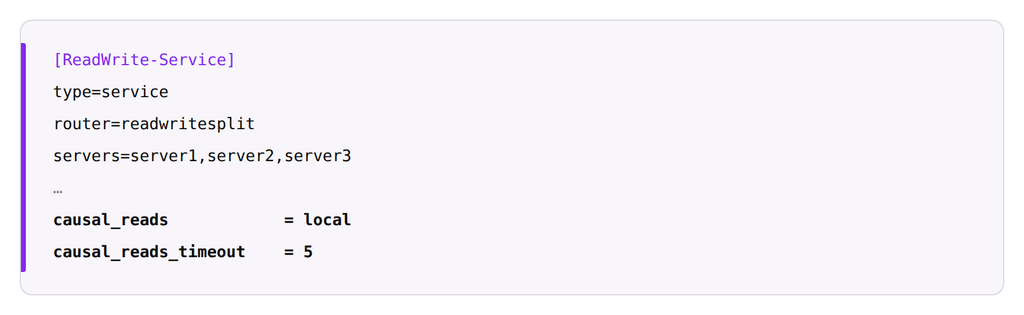
Learn more about enabling causal consistency with the Read/Write Split Router.
Since all of these failover features kick in automatically, DBAs can have peace of mind knowing that their applications will continue to run as usual, even if a database goes down.
Database Management
MaxScale also includes robust management features that make it far easier for admins to make changes to their databases.
Transparent Topology Changes
MaxScale enables admins to perform essential orchestration tasks easily, such as switchover with promoting or demoting replicas, bringing additional servers online, or initiating a manual failover that drains users gradually. All of these actions are transparent to the application. Overall, it makes it easier for your team to perform server maintenance and upgrades.
Rolling Upgrades
With MaxScale, rolling upgrades can be easily performed without downtime or outages from the application’s perspective. A minimum of three MariaDB servers is always a recommended production architecture to achieve this. With one primary and two replica MariaDB servers, one database server can be taken down and have the database, server, packages or hardware upgraded while a single primary and single replica node still serve the applications.
This is critical to avoid single points of failure during that maintenance/upgrade window. To start the process, set the replica server to a maintenance mode in MaxScale through MaxCtrl or with the GUI interface and let connections drain from the server. After the maintenance has been completed, bring the replica node back online, back in sync, and clear the maintenance status before starting maintenance on the next replica.
After each replica node is both healthy and back in sync, the primary node can be demoted to a replica with a switchover command (via MaxCtrl or the GUI) that will swap the running primary and promote a designated replica server to be the new primary. With all the same functions that perform a seamless and transparent failover, the switchover will be transparent to the application and once it is no longer the primary node, administrators can then
begin necessary maintenance on this final former primary node.
With all upgrades, it is recommended to always test first in a non-production environment with the same architecture, but also test and validate after the upgraded production servers are all healthy and back online post-rolling upgrade.
Replica Build / Rebuild
One of the most time-intensive, manual tasks DBAs perform is adding additional replica servers or rebuilding a replica server when data is out of sync or unrecoverable. With the replica rebuild feature in MaxScale, a DBA can easily build or rebuild a replica server by executing a single command. The command will connect to a source or “donor” database server, take a Mariabackup and stream that backup to the target or replica server to be rebuilt.
To enable this feature, a few steps must be completed in preparation. We recommend performing them on the initial setup of the MariaDB database servers and MaxScale.
- Install mariabackup, pigz, and socat on all MariaDB servers.
- Set up passwordless SSH connectivity between MaxScale and all database nodes, and add them to known_hosts.
- Open firewall ports 22, 3306, between MaxScale and the database servers and port 4444 between the database servers (for transfer of the backup file, this port can be changed with the rebuild_port parameter under the Monitor in the MaxScale configuration).
- Add SSH configurations to the router service in the MaxScale configuration.
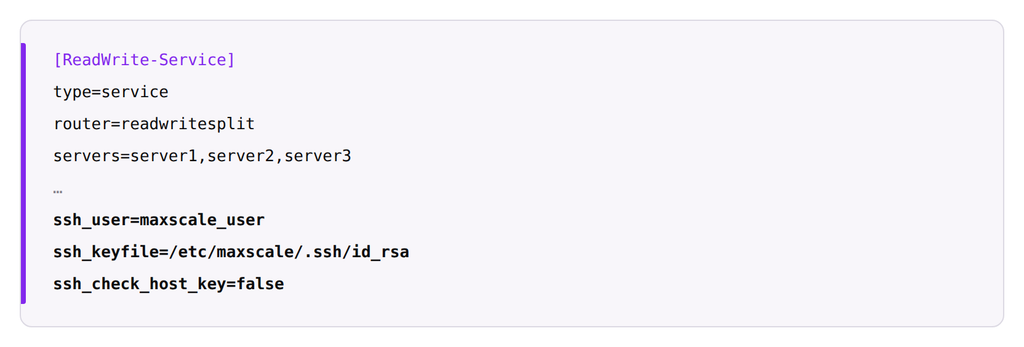
If needed, admins can rebuild a replica server by executing this command:

SOURCE_NODE
Server that will “donate” its data. In other words, this is where the Mariabackup will be executed and copied from.
TARGET_NODE
Server to be “rebuilt.” The server will have its current data wiped and replaced with the SOURCE_NODE’s backup.
MONITOR_NAME
Header name of the relevant monitor section containing both nodes in the maxscale.cnf file

Executing this command should return a success while the actual backup and restore is running in the background. To monitor that backup and restore, tail the MaxScale log file or run the following command to pull current status:

MaxScale utilizes MariaDB Enterprise Server Backup to easily clone the contents of another server, restore that backup, and bring the node back online with replication setup. To build a new replica node to replicate from the existing architecture/cluster, simply deploy a new, blank MariaDB server, set up the users, grants and permissions, and configuration in MaxScale. Follow the same steps as above to bring that additional replica online easily.
More detailed information about the rebuild replica configuration and capabilities can be found here.
GUI Monitoring
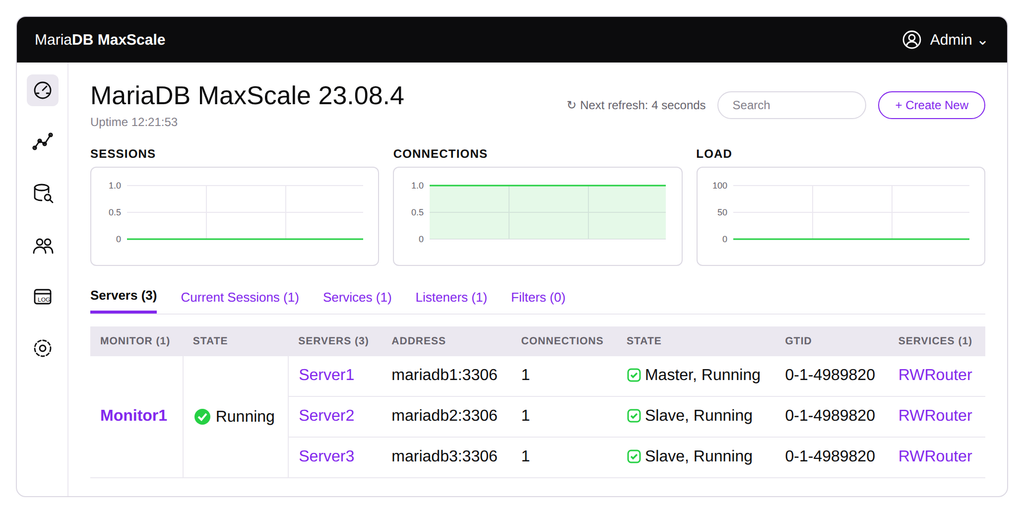
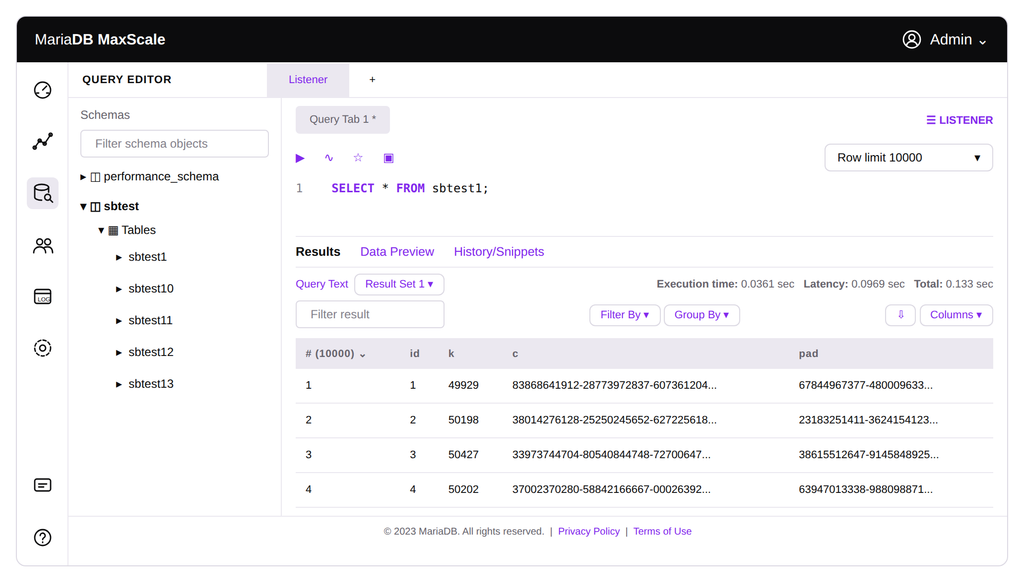
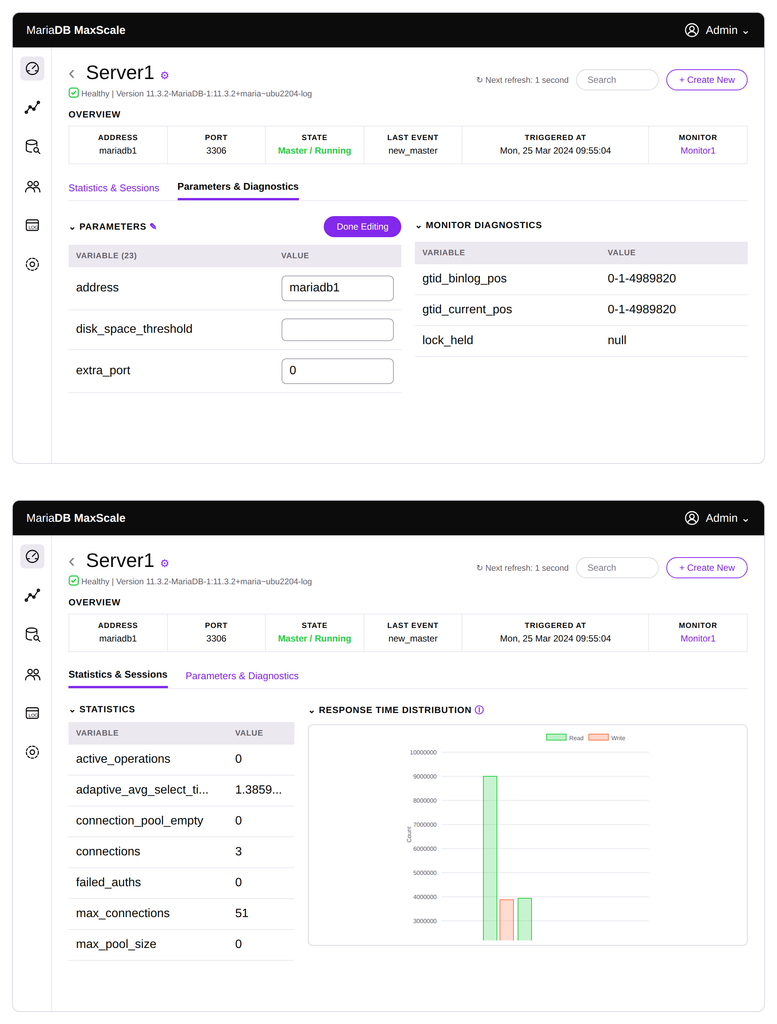
With MaxScale’s unique GUI, admins can easily monitor, manage and change their database configuration. It allows staff members to see what’s happening in their databases from a big-picture perspective. This GUI interface uses the REST API to make administrative operations easy. The root REST API resource (i.e., http://localhost:8989/) will serve the GUI webpage when enabled.
By default, all changes done at runtime via the MaxScale GUI or the REST API will be saved on disk inside the persistdir directory. The changes done at runtime will override the configuration found in the static configuration files (maxscale.cnf) for that particular object. To enable and secure the GUI interface, the following parameters can be defined under the [maxscale] section in the configuration file.
admin_gui
Enable or disable the admin graphical user interface. (Default is TRUE)
admin_host
The network interface where the REST API listens on. We recommend changing the MaxScale host server’s internal IP address to be accessible from clients that need to connect to the GUI webpage. (Default is 127.0.0.1 – this only listens for local connections)
admin_port
The port where the REST API listens. For security, this port address can be changed. (Default is 8989)
admin_secure_gui
To serve the GUI only over secure HTTPS connections. The default value is true. To be secure by default, the GUI is only served over HTTPS connections as it uses a token authentication scheme. This also controls whether the /auth endpoint requires an encrypted connection.
admin_ssl_key
The path to the TLS private key in PEM format for the admin interface.
If the admin_ssl_key and admin_ssl_cert options are all defined, the admin interface will use encrypted HTTPS instead of plain HTTP.
admin_ssl_cert
The path to the TLS public certificate in PEM format.
admin_ssl_ca_cert
The path to the TLS CA certificate in PEM format. If defined, the client certificate, if provided, will be validated against it. This parameter is optional, starting with MaxScale 2.3.19.
admin_ssl_version
Controls the minimum TLS version required to use the REST API.
Accepted values are:
- TLSv10
- TLSv11
- TLSv12
- TLSv13
- MAX
The default value is MAX, which negotiates the highest level of encryption that both the client and server support.
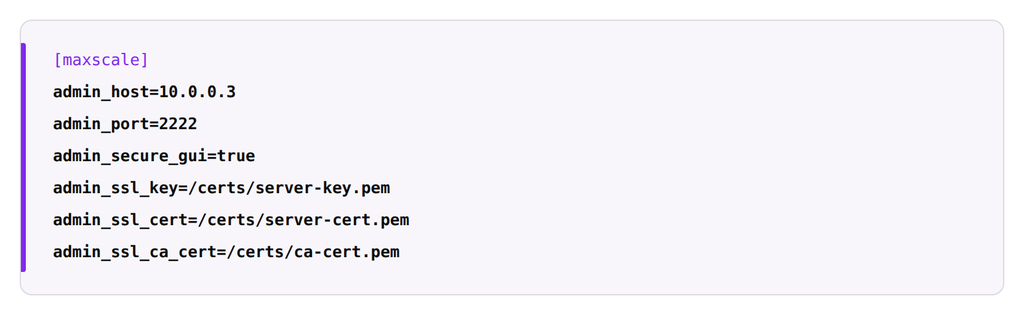
To allow the use of the GUI without having to configure TLS certificates for the MaxScale REST API, set this parameter to false. Here are a few of the most valuable GUI features for admins:
Dashboard monitoring for viewing primary and replica databases, connections and health statuses from a single pane of glass
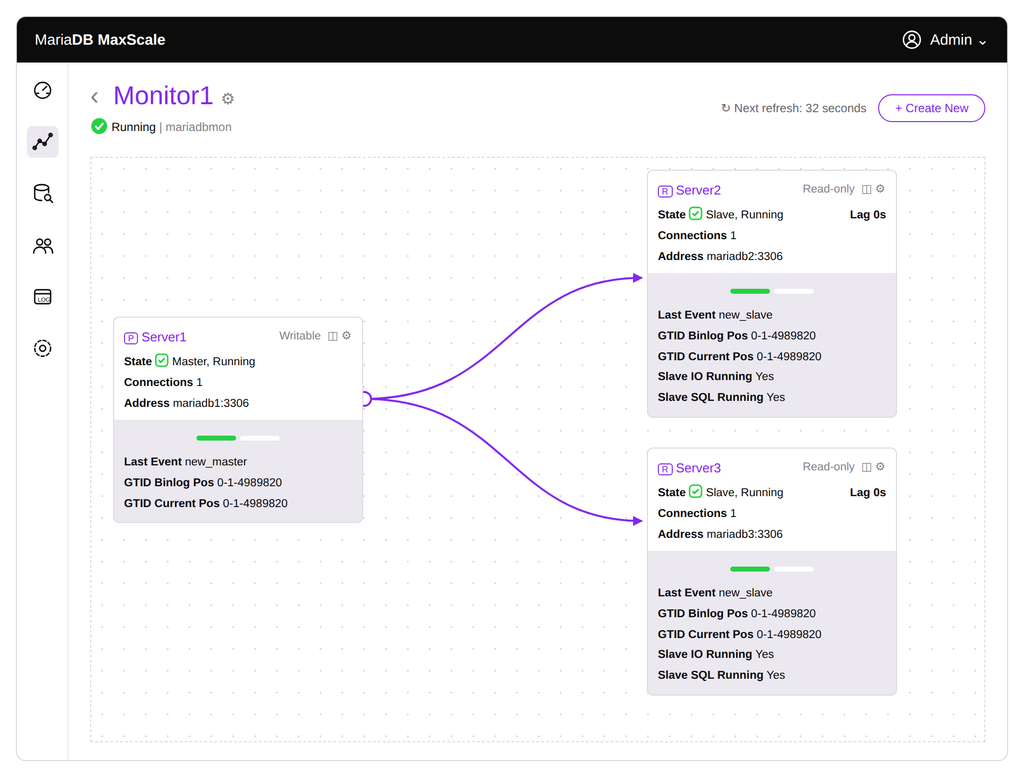
Visual map of configuration and cluster architecture for understanding how the back-end server is con
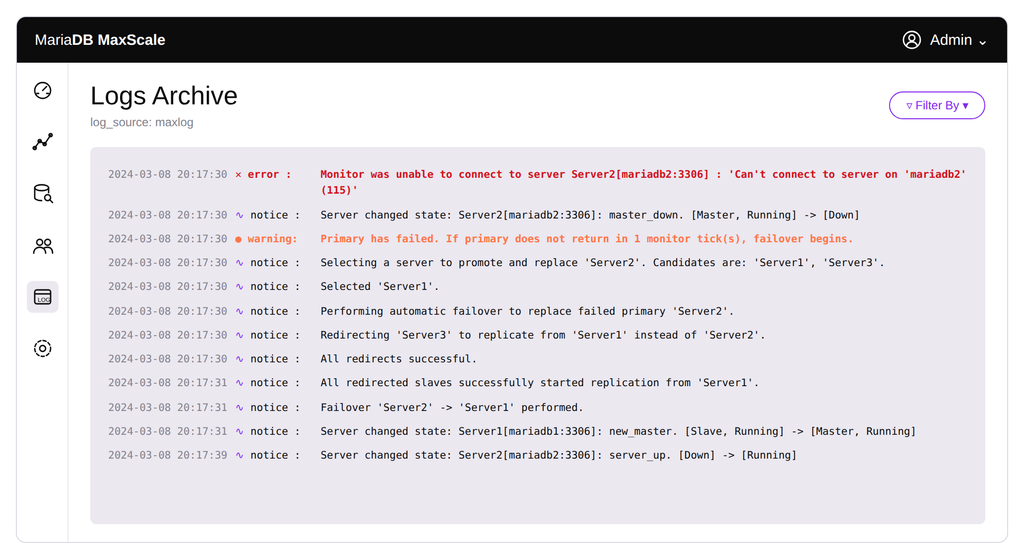
Logs for understanding recent actions.
Query editor for making manual changes to queries
Parameters and diagnostics view for drilling down and editing configurations.
Learn how to perform each of these functions with the MaxScale GUI.
MaxScale REST API
With MaxScale’s REST API, you can automate administration and make changes to your MaxScale configurations in seconds without needing to parse through back-end configurations or third-party tools. The MaxScale REST API uses HTTP Basic Access Authentication with the MaxScale administrative interface users. The default user is admin:mariadb.
It is highly recommended to enable HTTPS on the MaxScale REST API to secure the communication between the client and MaxScale. Without it, passwords can be intercepted from the network traffic. Refer to the configuration guide for more details on enabling HTTPS for the MaxScale REST API.
The MaxScale REST API provides the following resources. All resources conform to the JSON API specification.
Via the REST API, these resources can be monitored, created and changed programmatically, making administration and integration with other tools and monitors very flexible. Learn more about MaxScale’s REST API
Built-in Query Caching
MaxScale features automatically cached active transactions, with options for in-memory or shared storage with Redis or Memcached. Rather than going to a database, the transaction is served directly in MaxScale until a conflicting write statement is encountered to invalidate the cache. This can significantly increase the speed of frequently used queries and reduce the load on your databases.
Configuring Query Caching
Add caching to any existing service with this basic configuration:
Storage
Caching storage module, either local or shared.
storage_inmemory: Cache stored locally in memory on the MaxScale node and is not persistent.
storage_memcached: Uses Memcached for storing cached data that can be shared between multiple MaxScale nodes. Requires storage option parameters.
storage_redis: Uses Redis for storing cached data that can be shared between multiple MaxScale nodes. Requires storage option parameters.
storage_options
Additional parameters for caching storage.
server: Host and port location of the Memcached or Redis server. Required for Memcached and Redis.
max_value_size: Maximum size of a cached value. Required for Memcached.

hard_ttl
Hard time to live; the maximum amount of time the cached result is used before it is discarded and the result is fetched from the backend (and cached).
soft_ttl
Soft time to live; the amount of time – in seconds – the cached result is used before it is refreshed from the server. When soft_ttl has passed, the result will be refreshed when the first client requests the value. However, as long as hard_ttl has not passed, all other clients requesting the same value will use the result from the cache while it is being fetched from the backend. That is, as long as soft_ttl but not hard_ttl has passed, even if several clients request the same value at the same time, there will be just one request to the backend.
rules
The caching rules are expressed as a JSON object or as an array of JSON objects.
There are two decisions to make regarding the caching: in what circumstances should data be stored in the cache, and in what circumstances should the data in the cache be used? This can be stored in a JSON file on the server. Specifics on how to configure these rules can be found here
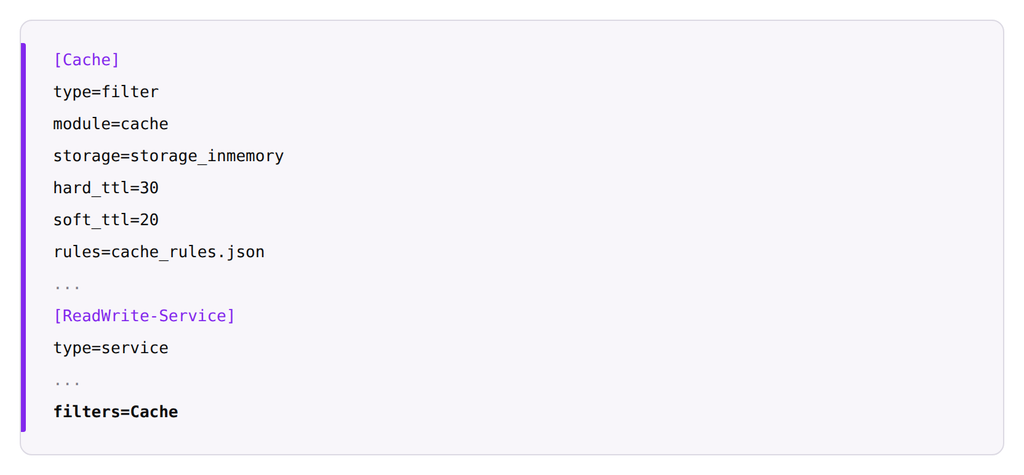
You may also need to experiment with configuration settings to find the ones that provide maximum benefit. View the full list of optional filter parameters.
Fill in the form to read the rest
How much downtime can your business afford? Downtime costs anywhere from $300,000 to more than $1 million an hour.* With that much riding on the line, every company needs a solid high availability strategy.
This in-depth guide provides an overview of high availability architectures and how MariaDB enables them via options such as replication with automatic failover and multimaster clustering. In addition, this guide will walk you through detailed steps and configuration options, including:
- Zero-interruption automatic failover, plus connection and session failover
- Delayed retries
- Cooperative monitoring
- Read/write split router
- Database management features such as transparent topology changes, rolling upgrades, replica build/rebuild, GUI monitoring, REST API and built-in query caching
- MariaDB disaster recovery recommendations
*Source: ITIC. Security, Data Breaches Top Cause of Downtime in 2022.
03MariaDB High Availability Architecture Choices
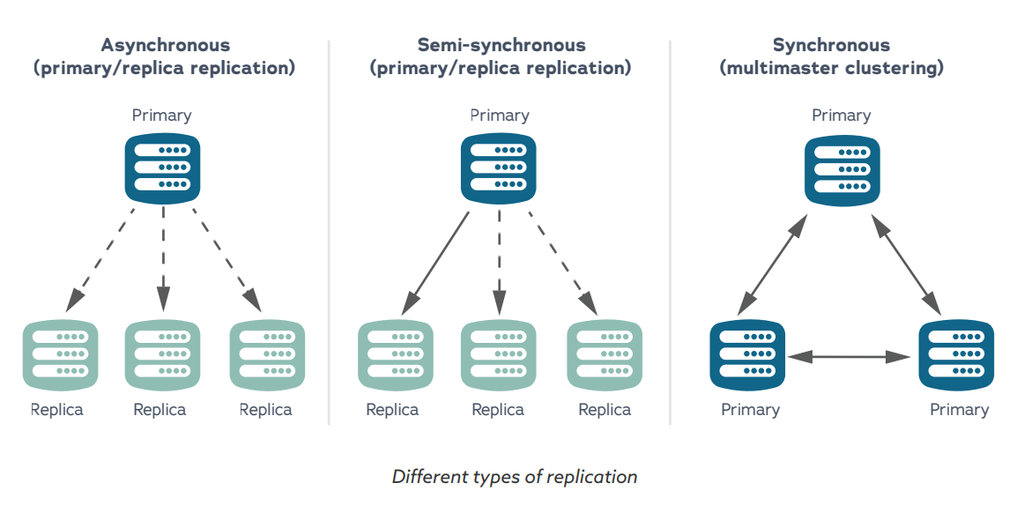
MaxScale features different architecture options based on customers’ needs. While most customers use asynchronous replication with automatic failover, we offer two other architectures for specific needs, such as increased throughput.
Replication and Cluster Topologies
Asynchronous Replication with Automatic Failover (Recommended)
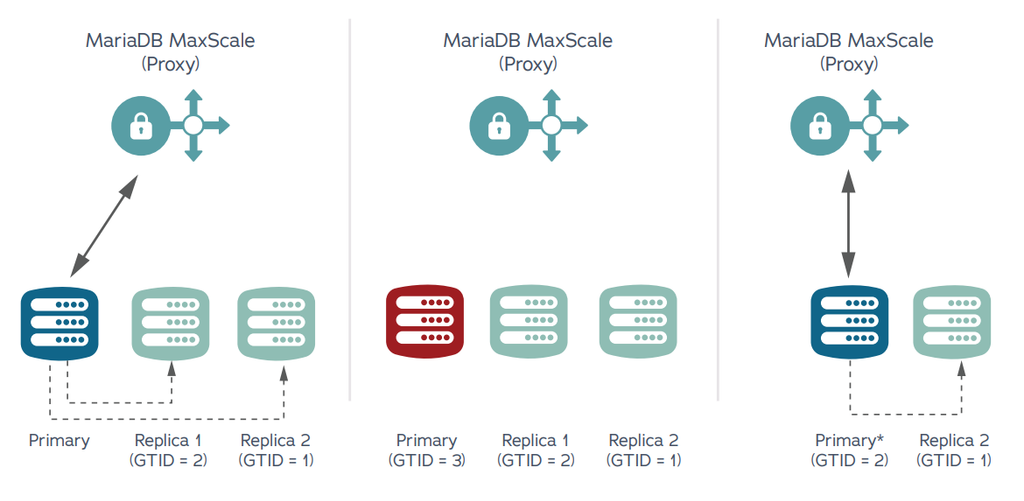
This setup leverages one primary and multiple replicas. In addition, the primary does not wait for a replica to confirm an event has been received. It also leverages standard replication. Because all replicas are updated to match the primary, automatic failover happens instantaneously.
This setup ensures zero downtime during a failover, making it the best fit for most organizations. With MaxScale automatic failover features, asynchronous replication is the most stable, consistent, low latency, highly available
option.
GALERA CLUSTER (MULTIMASTER CLUSTERING)
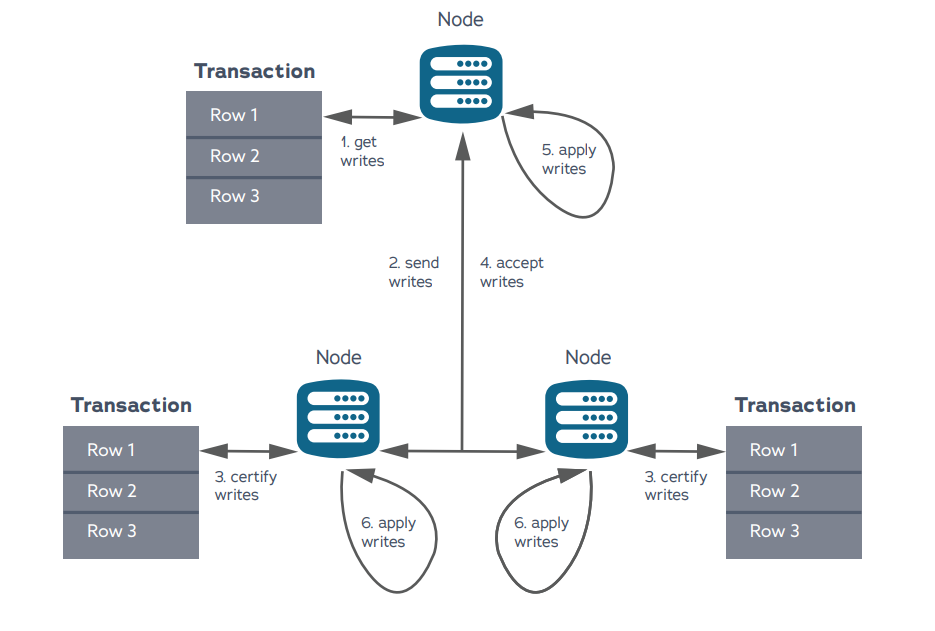
Galera Cluster leverages fully synchronous replication. With this configuration, multimaster read-write nodes must respond that they have received the events. There is a full copy of the data on every node.
If there is a node failure, the cluster will automatically remove it, and MariaDB MaxScale will stop routing queries to the failed node. The database proxy will select a different node to route traffic to. This process is possible because of the synchronous replication.
While this option is a good fit for organizations that require unusually high throughput, the high transaction load can cause contention and delays. In addition, commits can lag as they wait on all nodes to respond to writes.
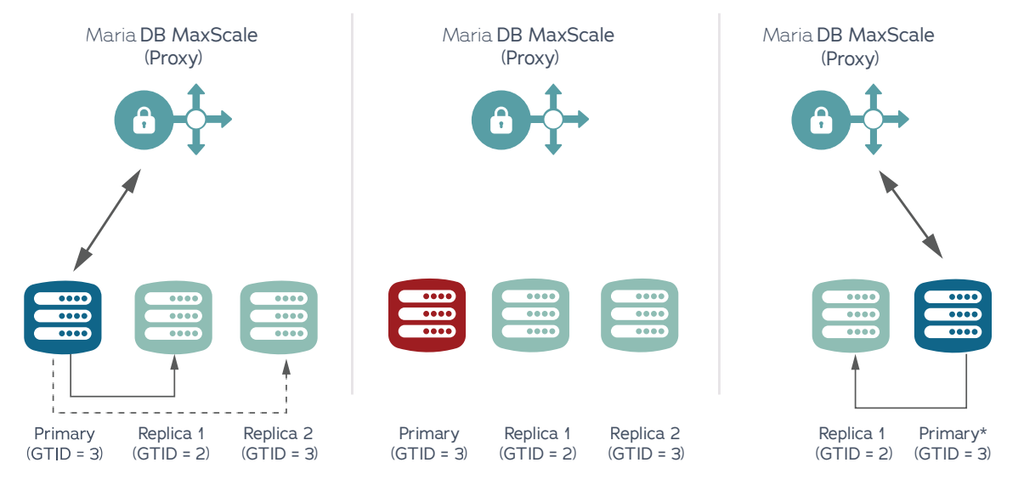
Semi-Synchronous Replication with Automatic Failover (Recommended)
This setup leverages one primary and multiple replicas. But unlike asynchronous replication, at least one replica must acknowledge that it has received and logged events. While this setup helps organizations with geographic dispersion that requires asset compliance across geography, it often causes lags.
04MariaDB Disaster Recovery Recommendations
A well-defined disaster recovery (DR) strategy and plan are essential to all enterprise production systems to protect the data and ensure its availability in a growing number of potential natural or human-caused disaster scenarios. To ensure a reasonable cost-to-risk design, start with the following:
- A clearly defined budget
- Recovery point objective (RPO) or maximum acceptable data loss
- Recovery time objective (RTO) or maximum amount of time the data can be inaccessible before being restored
- Maximum tolerable downtime (MTD) or maximum total time allowable from an outage to successful recovery
There are many solutions and approaches to achieve different levels of DR. Testing your DR plan, backups and time to recover on a regular basis is best practice to ensure times are within expected ranges. Below are a few of the more common DR methods used with MariaDB.
Standby DR Site
In addition to the primary region of three or more MariaDB nodes replicating or in a cluster, a standby DR region can be created with live servers receiving replicated data from the primary region. This could be done in two different geographical on-premises data centers, different cloud regions, across different cloud providers, or even from on premise to cloud topologies.
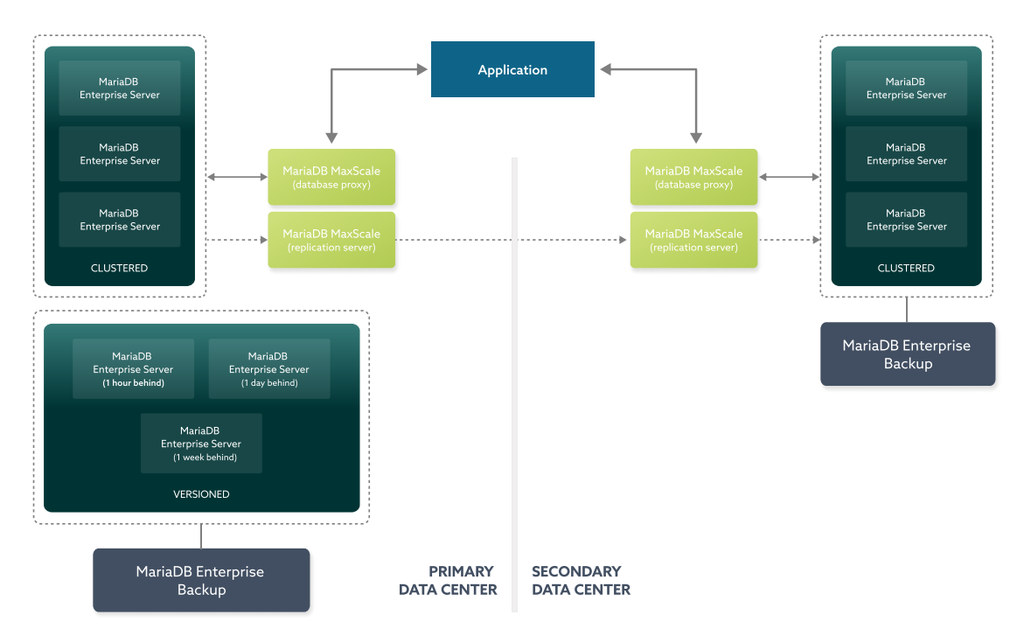
There are also various architectures and designs to use, depending on RTO and RPO. A full-scale deployment would include a complete mirror of the primary region with the same architecture, server sizes and design in the DR region online, in sync and available at any time for a DR failover. It is generally not recommended to use DRBD or virtualization tools for replication but to utilize the benefits of MaxScale and asynchronous replication. This method should provide a very low RTO and RPO but a high budget.
Delayed Replica
An additional replica server configured with a replication delay of a few hours or day can be extremely helpful in scenarios where a malicious or accidental action occurs in the database and deletes, drops or truncates essential data. Data can be easily retrieved from the live, delayed replica with RTO time. RPO can be reduced if the exact time is known and the binary logs can be replayed on the delayed replica to right before the incident of data loss.
To change a live, in-sync replica to a delayed replica, simply set the replication parameter MASTER_DELAY to a value in seconds of how long the delay needs to be.
CHANGE MASTER TO MASTER_DELAY=3600; for a 1-hour replication delay
Point-In-Time Recovery Plan
MariaDB offers precise point-in-time recovery using MariaDB Enterprise Backup to restore data from one or more
backups and the binary log to roll forward transactions from the last backup until the specified point in time is
reached. The key to a successful point-in-time recovery is a robust backup strategy. Critical components to a
successful point-in-time recovery include ensuring your binary logs and backups are available in a location in the event of server failure, scheduling frequent full and incremental enterprise backups and ensuring binary log retention and copies are available.
Full and Incremental Enterprise Backups
The fastest, most efficient, secure, and recommended backup tool is MariaDB Enterprise Backup. MariaDB Enterprise Backup takes a physical, file-level online backup that is non-blocking and provides a consistent restore. Enterprise Backup can be configured to take full backups or incremental backups. It is recommended that these backups be stored in one or more locations that are secure, separately located from the source (not on the same drive), and easily accessible in case a quick restore (close, fast network hop or NFS system) is needed.
A good secondary location could be in a DR region, geographically separate location or cloud storage like Amazon
S3. Depending on database sizes and cost constraints, the frequency of these backups can vary. But for best practice starting recommendations, schedule a full backup weekly and incremental backups daily. A more aggressive schedule for stricter RPO/RTO guidelines (or large changes in data sizes) could take full backups daily and incremental backups every four hours. Learn more about MariaDB Enterprise Backup
Binary Logs
Binary logs (aka binlogs) must be enabled for replication. They are stored locally and contain a record of all changes to the databases – both data and structure as well as how long each statement took to execute. Binlogs should be kept long enough to ensure successful replication to all replicas and a successful point-in-time recovery. It is recommended to set the binlog retention period long enough to cover two full backups (in case of a backup failure). Be aware of the rate of binlog growth and monitor the drive. Filling the drive can cause outages and problems.
expire_logs_days
Binary logs will be purged after expire_logs_days recorded in days.
binlog_expire_logs_seconds
Binary logs will be purged after binlog_expire_logs_seconds recorded in seconds, this is linked to expire_logs_
days and will automatically change or be changed to the converted equivalent value.
It is also recommended to take frequent copies of binlogs, stored in a secure DR region, geographically separate
location or cloud storage like S3. This can be done automatically with MaxScale’s binlog router installed on a
standalone server in a DR region (on-prem or cloud based).
MariaDB Flashback
If data has been wrongly deleted or modified recently, MariaDB flashback can roll back transactions to restore the
database to a point in time right before the data was deleted or modified – this is faster than restoring a database from one or more backups or restoring from a delayed replica. Binary logs need to be available going back to the incident of deletion or modification.
05Conclusion
With MariaDB Enterprise Server with MaxScale, organizations have multiple high availability strategies to meet their business needs – all in a single solution.
This white paper walks through how to get started and use MariaDB Enterprise Server with MaxScale; however, there are many more high availability best practices that may be worth implementing depending on your specific use case. MariaDB can work with your organization to help you achieve the level of high availability that your business requires (i.e., four nines equals 52.56 minutes of downtime per year, while five nines equals 5.26 minutes of downtime per year and six nines equals 31.5 seconds of downtime per year).
Contact us about a MariaDB subscription that combines our enterprise open source products with services and support for production deployments and peace of mind.
If you’re ready to take the plunge, contact MariaDB.